Hello all,
I'm having troubles configuring the data gateway in our PBI reports online. When published a report, this contains values for the datsource. When configuring this online you can map these values to a gateway datasource. These are the values:
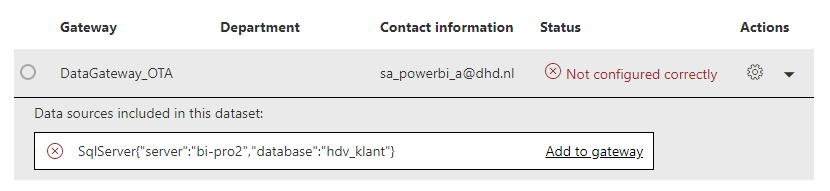
I'm unable to map these to an existing datasource on an already running gateway. The only difference are caps. Question: the values for datasource in the report, limit me in my choice for the datasource online. Is this correct? This seems so poorly designed. I need to be free in my selection for the datasource, no matter what I entered in the desktop report. The only option now is to add the source from the report to the gateway, which will mean that I have then two sources pointing two the same source. Only difference is in the values (database Sales vs sales or server BI-PRD vs bi-prd)


