This time we’re going bigger than ever. Fabric, Power BI, SQL, AI and more. We're covering it all. You won't want to miss it.
Learn moreDid you hear? There's a new SQL AI Developer certification (DP-800). Start preparing now and be one of the first to get certified. Register now
Hello all,
I'm having troubles configuring the data gateway in our PBI reports online. When published a report, this contains values for the datsource. When configuring this online you can map these values to a gateway datasource. These are the values:
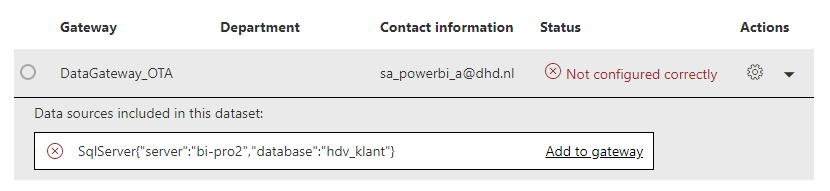
I'm unable to map these to an existing datasource on an already running gateway. The only difference are caps. Question: the values for datasource in the report, limit me in my choice for the datasource online. Is this correct? This seems so poorly designed. I need to be free in my selection for the datasource, no matter what I entered in the desktop report. The only option now is to add the source from the report to the gateway, which will mean that I have then two sources pointing two the same source. Only difference is in the values (database Sales vs sales or server BI-PRD vs bi-prd)
Solved! Go to Solution.
It is case sensitive. The source in your model must match the source in the gateway exactly.
Kind of makes sense and was what I expected so thanks for the confirmation. However even when I change the datasource in the PBIX to the excact same name as the gateway source, it (the connection to map from the PBIX) still remains in small caps when I try to map it online.
Check out the April 2026 Power BI update to learn about new features.
Sign up to receive a private message when registration opens and key events begin.
If you have recently started exploring Fabric, we'd love to hear how it's going. Your feedback can help with product improvements.
| User | Count |
|---|---|
| 10 | |
| 8 | |
| 8 | |
| 7 | |
| 7 |
| User | Count |
|---|---|
| 50 | |
| 27 | |
| 23 | |
| 22 | |
| 22 |