Get certified for free when you join Fabric Data Days 2026 and dive into Fabric, Power BI, SQL, AI, and other essential data skills.
Join nowJuly 7 - July 17 | Round 2 of the Power BI Dataviz World Championships. Don't miss your chance! Learn more
Hi, we are having some trouble to get the new audiences feature working. If we don't add users as viewer on the workspace that hosts the app, they can't see anything (or can see reports with a can't load data error). But adding access to the workspace means that the hide report features in the audience view gets bypassed, making them redundant because everyone with view access to a workspace can see all of the audience views.
Can you please help?
Thanks!
Solved! Go to Solution.
Hi, @bahrak
It's weird, can you show some relevant screenshots?
Usually the audience can directly access the content in the application and you don't need to add "viewer" permissions for these visitors.
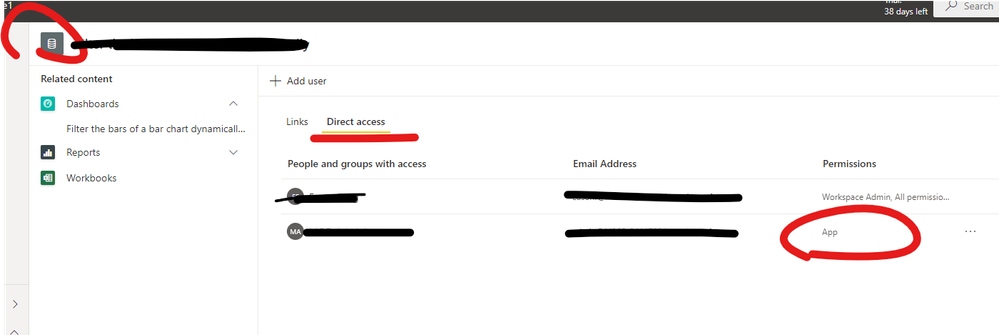
Please check the dataset permissions first to ensure that these visitors have successfully gained access to the dataset (App).
Best Regards,
Community Support Team _ Eason
Hi, @bahrak
It's weird, can you show some relevant screenshots?
Usually the audience can directly access the content in the application and you don't need to add "viewer" permissions for these visitors.
Please check the dataset permissions first to ensure that these visitors have successfully gained access to the dataset (App).
Best Regards,
Community Support Team _ Eason
Thank you! That was the cuplrit! I didn't realise the groups needed to be added in the permissions of the models for this to work.
Join us in Barcelona for FabCon and SQLCon, the Fabric, Power BI, SQL, and AI community event. Save €200 with code FABCMTY200.
Join Data Days 2026: 60 days of free live/on-demand sessions, challenges, study groups, and certification opportunities.
| User | Count |
|---|---|
| 25 | |
| 10 | |
| 10 | |
| 5 | |
| 4 |