This time we’re going bigger than ever. Fabric, Power BI, SQL, AI and more. We're covering it all. You won't want to miss it.
Learn moreLevel up your Power BI skills this month - build one visual each week and tell better stories with data! Get started
Hi, we are having some trouble to get the new audiences feature working. If we don't add users as viewer on the workspace that hosts the app, they can't see anything (or can see reports with a can't load data error). But adding access to the workspace means that the hide report features in the audience view gets bypassed, making them redundant because everyone with view access to a workspace can see all of the audience views.
Can you please help?
Thanks!
Solved! Go to Solution.
Hi, @bahrak
It's weird, can you show some relevant screenshots?
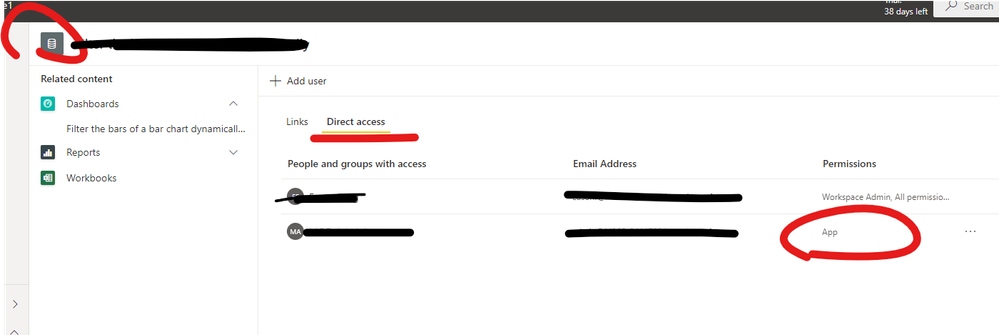
Usually the audience can directly access the content in the application and you don't need to add "viewer" permissions for these visitors.
Please check the dataset permissions first to ensure that these visitors have successfully gained access to the dataset (App).
Best Regards,
Community Support Team _ Eason
Hi, @bahrak
It's weird, can you show some relevant screenshots?
Usually the audience can directly access the content in the application and you don't need to add "viewer" permissions for these visitors.
Please check the dataset permissions first to ensure that these visitors have successfully gained access to the dataset (App).
Best Regards,
Community Support Team _ Eason
Thank you! That was the cuplrit! I didn't realise the groups needed to be added in the permissions of the models for this to work.
Check out the April 2026 Power BI update to learn about new features.
Sign up to receive a private message when registration opens and key events begin.
If you have recently started exploring Fabric, we'd love to hear how it's going. Your feedback can help with product improvements.
| User | Count |
|---|---|
| 11 | |
| 9 | |
| 9 | |
| 7 | |
| 7 |
| User | Count |
|---|---|
| 48 | |
| 27 | |
| 24 | |
| 24 | |
| 23 |