Don't miss your chance to take the Fabric Data Engineer (DP-600) exam for FREE! Find out how by attending the DP-600 session on April 23rd (pacific time), live or on-demand.
Learn moreNext up in the FabCon + SQLCon recap series: The roadmap for Microsoft SQL and Maximizing Developer experiences in Fabric. All sessions are available on-demand after the live show. Register now
Hi everyone,
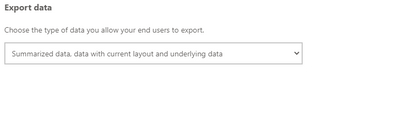
I would like to enable downloading the underlying data of a visual in Power BI Service, so I changed the settings for the report in the workspace:
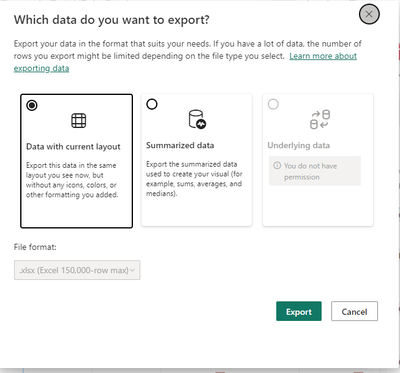
While this work fine for me as I am able to export the underlying data now, my users are not able to. Below you will find a screenshot that one of them sent me:
Do you know what I did wrong?
Any feedback you can give me on this would be highly appreciated.
Solved! Go to Solution.
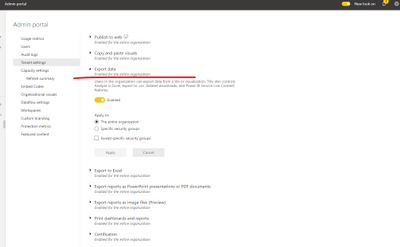
It's important to note that if the Power BI admin portal settings conflict with the report settings for export data, the admin settings will override the export data settings.
Please check with the administrator whether the "export data" function is enabled for entire organization in the admin portal.
Related documents:
About the admin portal - Power BI | Microsoft Learn
Export data from a Power BI visualization - Power BI | Microsoft Learn
Best Regards,
Community Support Team _ Caitlyn
If this post helps then please consider Accept it as the solution to help the other members find it more quickly.
It's important to note that if the Power BI admin portal settings conflict with the report settings for export data, the admin settings will override the export data settings.
Please check with the administrator whether the "export data" function is enabled for entire organization in the admin portal.
Related documents:
About the admin portal - Power BI | Microsoft Learn
Export data from a Power BI visualization - Power BI | Microsoft Learn
Best Regards,
Community Support Team _ Caitlyn
If this post helps then please consider Accept it as the solution to help the other members find it more quickly.
If you have recently started exploring Fabric, we'd love to hear how it's going. Your feedback can help with product improvements.
A new Power BI DataViz World Championship is coming this June! Don't miss out on submitting your entry.
Share feedback directly with Fabric product managers, participate in targeted research studies and influence the Fabric roadmap.
| User | Count |
|---|---|
| 11 | |
| 11 | |
| 9 | |
| 8 | |
| 8 |
| User | Count |
|---|---|
| 30 | |
| 29 | |
| 20 | |
| 15 | |
| 15 |