Get certified for free when you join Fabric Data Days 2026 and dive into Fabric, Power BI, SQL, AI, and other essential data skills.
Join nowJuly 7 - July 17 | Round 2 of the Power BI Dataviz World Championships. Don't miss your chance! Learn more
Hi everyone,
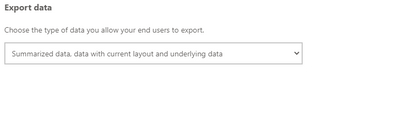
I would like to enable downloading the underlying data of a visual in Power BI Service, so I changed the settings for the report in the workspace:
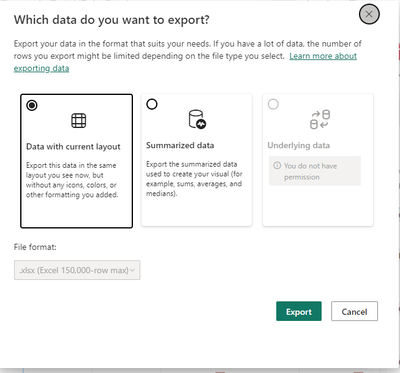
While this work fine for me as I am able to export the underlying data now, my users are not able to. Below you will find a screenshot that one of them sent me:
Do you know what I did wrong?
Any feedback you can give me on this would be highly appreciated.
Solved! Go to Solution.
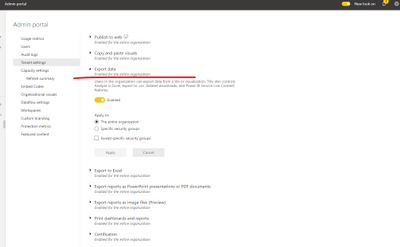
It's important to note that if the Power BI admin portal settings conflict with the report settings for export data, the admin settings will override the export data settings.
Please check with the administrator whether the "export data" function is enabled for entire organization in the admin portal.
Related documents:
About the admin portal - Power BI | Microsoft Learn
Export data from a Power BI visualization - Power BI | Microsoft Learn
Best Regards,
Community Support Team _ Caitlyn
If this post helps then please consider Accept it as the solution to help the other members find it more quickly.
It's important to note that if the Power BI admin portal settings conflict with the report settings for export data, the admin settings will override the export data settings.
Please check with the administrator whether the "export data" function is enabled for entire organization in the admin portal.
Related documents:
About the admin portal - Power BI | Microsoft Learn
Export data from a Power BI visualization - Power BI | Microsoft Learn
Best Regards,
Community Support Team _ Caitlyn
If this post helps then please consider Accept it as the solution to help the other members find it more quickly.
Join us in Barcelona for FabCon and SQLCon, the Fabric, Power BI, SQL, and AI community event. Save €200 with code FABCMTY200.
Join Data Days 2026: 60 days of free live/on-demand sessions, challenges, study groups, and certification opportunities.
| User | Count |
|---|---|
| 24 | |
| 10 | |
| 9 | |
| 5 | |
| 4 |