cancel
Showing results for 
Search instead for 
Did you mean: 

Level up your Power BI skills this month - build one visual each week and tell better stories with data! Get started

Reply
Anonymous
Not applicable

Invoke Custom Function returns an error in Dataflow

I'm trying to use an excel file (on sharepoint) with a list of Segment IDs as input to a function in a Dataflow (as per in this video).


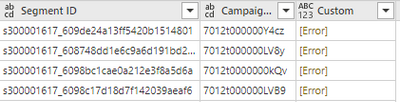
All works until I get to the stage where I "Invoke Custom Function", and the column returns an error.  I don't know enough to decipher the error unfortunately.
 

sanfly_0-1625651931583.png


sanfly_1-1625651996450.png


let
  Source = SharePoint.Files("https://mycompany.sharepoint.com/sites/CentralMarketingTeam", [ApiVersion = 15]),
  #"Filtered rows" = Table.SelectRows(Source, each [Folder Path] = "https://mycompany.sharepoint.com/sites/CentralMarketingTeam/Data Vault/Web Pages and Segments/" and [Name] = "Campaign Web Pages and Segments.xlsx"),
  #"Filtered hidden files" = Table.SelectRows(#"Filtered rows", each [Attributes]?[Hidden]? <> true),
  #"Invoke custom function" = Table.AddColumn(#"Filtered hidden files", "Transform file", each #"Transform file"([Content])),
  #"Renamed columns" = Table.RenameColumns(#"Invoke custom function", {{"Name", "Source.Name"}}),
  #"Removed other columns" = Table.SelectColumns(#"Renamed columns", {"Source.Name", "Transform file"}),
  #"Expanded table column" = Table.ExpandTableColumn(#"Removed other columns", "Transform file", Table.ColumnNames(#"Transform file"(#"Sample file"))),
  #"Changed column type" = Table.TransformColumnTypes(#"Expanded table column", {{"Source.Name", type text}, {"Segment Name", type text}, {"Segment ID", type text}, {"Campaign ID", type text}}),
  #"Removed columns" = Table.RemoveColumns(#"Changed column type", {"Source.Name"}),
  #"Invoked custom function" = Table.AddColumn(#"Removed columns", "Custom", each GetCampaignSegmentIDs([Segment ID]))
in
  #"Invoked custom function"


1 ACCEPTED SOLUTION
v-easonf-msft
Community Support
Community Support

Hi, @Anonymous 

After ensuring that the function is created and called correctly, you also need to check the firewall.

Please refer to this related thread.

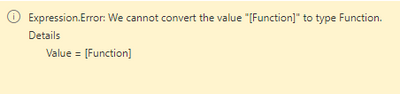
Expression.Error: Cannot convert the value "[Function]" to type Function 


Best Regards,
Community Support Team _ Eason

View solution in original post

3 REPLIES 3
v-easonf-msft
Community Support
Community Support

Hi, @Anonymous 

After ensuring that the function is created and called correctly, you also need to check the firewall.

Please refer to this related thread.

Expression.Error: Cannot convert the value "[Function]" to type Function 


Best Regards,
Community Support Team _ Eason

Anonymous
Not applicable

Thanks for your help, looks like I didn't have "Organisational" for all my Data Source Credentials.  Updating all the credentials to Organisational fixed this.

Anonymous
Not applicable

Bump

Helpful resources

Announcements
April Power BI Update Carousel

Power BI Monthly Update - April 2026

Check out the April 2026 Power BI update to learn about new features.

Fabric SQL PBI Data Days

Data Days 2026 coming soon!

Sign up to receive a private message when registration opens and key events begin.

New to Fabric survey Carousel

New to Fabric Survey

If you have recently started exploring Fabric, we'd love to hear how it's going. Your feedback can help with product improvements.

Power BI DataViz World Championships carousel

Power BI DataViz World Championships - June 2026

A new Power BI DataViz World Championship is coming this June! Don't miss out on submitting your entry.