
Don't miss your chance to take the Fabric Data Engineer (DP-600) exam for FREE! Find out how by watching the DP-600 session on-demand now through April 28th.
Learn moreJoin the FabCon + SQLCon recap series. Up next: Power BI, Real-Time Intelligence, IQ and AI, and Data Factory take center stage. All sessions are available on-demand after the live show. Register now
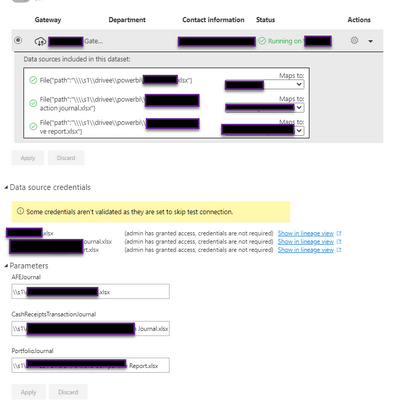
Hi all, I have reviewed and researched all I can to resolve this error. As you can see in the the dataset below all the settings look good. I am using a parameter to document the source. You can see below that "credentials are not required". The Desktop PBIX has a Privacy Level of None. The Gateway connections all look good and the connections are successful. Their privacy level is Organizational. Does this make a difference? If Credentials are Not Required as noted below, why the Invalid Credentials Error?
Solved! Go to Solution.
Hi, @Razorbx13
According to the error message, Please try not to check the 'skip test connection' button in the data source setting.
Did I answer your question ? Please mark my reply as solution. Thank you very much.
If not, please feel free to ask me.
Best Regards,
Community Support Team _ Janey
You need to match the privacy levels. Otherwise you are not comparing apples to apples.
DAX is for Analysis. Power Query is for Data Modeling
Proud to be a Super User!
MCSA: BI ReportingSo I matched them, still an issue. This is what my Gateway looks like. Both have a privacy level of None. The data source in the PBIX and the Gateway here. The only thing that happens is once I publish I change the parameter to point to the file noted in this Gateway.
so should I make the gateway one to be None as well based on the credential notes I see in the gateway?
Check out the April 2026 Power BI update to learn about new features.
If you have recently started exploring Fabric, we'd love to hear how it's going. Your feedback can help with product improvements.
A new Power BI DataViz World Championship is coming this June! Don't miss out on submitting your entry.
| User | Count |
|---|---|
| 9 | |
| 8 | |
| 8 | |
| 8 | |
| 7 |