
Learn from the best! Meet the four finalists headed to the FINALS of the Power BI Dataviz World Championships! Register now
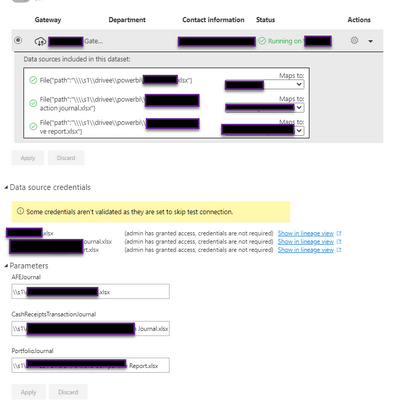
Hi all, I have reviewed and researched all I can to resolve this error. As you can see in the the dataset below all the settings look good. I am using a parameter to document the source. You can see below that "credentials are not required". The Desktop PBIX has a Privacy Level of None. The Gateway connections all look good and the connections are successful. Their privacy level is Organizational. Does this make a difference? If Credentials are Not Required as noted below, why the Invalid Credentials Error?
Solved! Go to Solution.
Hi, @Razorbx13
According to the error message, Please try not to check the 'skip test connection' button in the data source setting.
Did I answer your question ? Please mark my reply as solution. Thank you very much.
If not, please feel free to ask me.
Best Regards,
Community Support Team _ Janey
You need to match the privacy levels. Otherwise you are not comparing apples to apples.
DAX is for Analysis. Power Query is for Data Modeling
Proud to be a Super User!
MCSA: BI ReportingSo I matched them, still an issue. This is what my Gateway looks like. Both have a privacy level of None. The data source in the PBIX and the Gateway here. The only thing that happens is once I publish I change the parameter to point to the file noted in this Gateway.
so should I make the gateway one to be None as well based on the credential notes I see in the gateway?
| User | Count |
|---|---|
| 24 | |
| 19 | |
| 11 | |
| 10 | |
| 7 |
| User | Count |
|---|---|
| 42 | |
| 36 | |
| 20 | |
| 18 | |
| 16 |