cancel
Showing results for 
Search instead for 
Did you mean: 

A new Data Days event is coming soon! This time we’re going bigger than ever. Fabric, Power BI, SQL, AI and more. Don't miss out.

Reply

Incremental Refresh - Report not updating in service

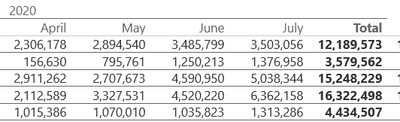
I have followed the procedure with parameters to implement incremental refresh for two reports.  Data is loading in dekstop.  I have published to the service, but now no data is displaying for the current period in teh report, it has stopped updating.   I wonder what might have gone wrong?  As you can see there is no August.


bruceandersonBI_0-1596786771550.png


1 ACCEPTED SOLUTION

I changed one of the affected reports and moved the incremental refresh to the date dimension table.  Now it is refreshing.  So it would seem to be a requirement.  Though would be great to get confirmation.  In none of the resources I have found have I seen that it is a requirement.  Sometimes for a simple datasource a date dimension table is not needed.  

View solution in original post

5 REPLIES 5
Anonymous
Not applicable

Hi @bruceandersonBI,

How did your refresh configure? Can you share the steps of the detailed operations to help us clarify this scenario?

How to Get Your Question Answered Quickly 
In addition, please also refer to the following document to confirm if your steps did not match with the tutorial:

Incremental refresh in Power BI 

BTW, you can also take a look at the 'data refresh in power bi' to check your configurations of the refresh.

Data refresh in Power BI 

Regards,

Xiaoxin Sheng

Hi Xiaoxin,

Thanks, I have quadruple checked that I followed that procedure correctly.  It does not mention the need to use date dimension for the parameters and so I have not, not sure if that is the issue.  For the data refresh, I have confirmed settings are fine.  This report was refreshing fine daily for over a year before I reuploaded the (now inremental refresh version) of the .pbix file.

I changed one of the affected reports and moved the incremental refresh to the date dimension table.  Now it is refreshing.  So it would seem to be a requirement.  Though would be great to get confirmation.  In none of the resources I have found have I seen that it is a requirement.  Sometimes for a simple datasource a date dimension table is not needed.  

vanessafvg
Community Champion
Community Champion

its hard to know without looking at your data, how does it normally refresh, do you have some filter in the background, has your date dimension got all the values it needs. is this an imported model?


If I took the time to answer your question and I came up with a solution, please mark my post as a solution and /or give kudos freely for the effort 🙂 Thank you!

Proud to be a Super User!


Thanks for posting. I have confirmed it is not a filter.  The data is completely unfiltered.

The data is coming through the On premise gateway from an SQL server.  It is scheduled to refresh several times a day.  The refresh itself is showing as successful, however finishes in less than a second or two.  


You mention date dimension, does the parameters need to be set on a the date dimension table? Because I have set them on the data table, not the date dimension table. 

Helpful resources

Announcements
May Power BI Update Carousel

Power BI Monthly Update - May 2026

Check out the May 2026 Power BI update to learn about new features.

Fabric SQL PBI Data Days

Data Days 2026 coming soon!

Sign up to receive a private message when registration opens and key events begin.

New to Fabric survey Carousel

New to Fabric Survey

If you have recently started exploring Fabric, we'd love to hear how it's going. Your feedback can help with product improvements.

Power BI DataViz World Championships carousel

Power BI DataViz World Championships - June 2026

A new Power BI DataViz World Championship is coming this June! Don't miss out on submitting your entry.