cancel
Showing results for 
Search instead for 
Did you mean: 

We've captured the moments from FabCon & SQLCon that everyone is talking about, and we are bringing them to the community, live and on-demand. Starts on April 14th. Register now

Reply
jb19
New Member

Inconsistent sorting issues from excel source data

Capture.PNG


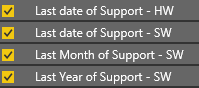
I am using 2 columns in excel formatted as dates to generate two separate bar charts in power BI. One column shows in fields as broken down into date, month, year and so allows me to sort and manipulate the data (see picture. However the other column does not have it's date separated in the fields (missing Month and Year) so I can't sort it properly.


I thought it may be because one column was sourced using a vlookup but I changed this to the same date format as the other one(copied and pasted as text, then coverted to date) and I'm still having the same issue.


Stuck on this so would appreciate any help.


2 REPLIES 2
jthomson
Solution Sage
Solution Sage

What data type are these showing as in Power BI? Are they both dates or is one formatted as text?

Hi thanks for replying. How do I check this? I'm new to Power BI and am using the web version.

Helpful resources

Announcements
New to Fabric survey Carousel

New to Fabric Survey

If you have recently started exploring Fabric, we'd love to hear how it's going. Your feedback can help with product improvements.

Power BI DataViz World Championships carousel

Power BI DataViz World Championships - June 2026

A new Power BI DataViz World Championship is coming this June! Don't miss out on submitting your entry.

Join our Fabric User Panel

Join our Fabric User Panel

Share feedback directly with Fabric product managers, participate in targeted research studies and influence the Fabric roadmap.

March Power BI Update Carousel

Power BI Community Update - March 2026

Check out the March 2026 Power BI update to learn about new features.