This time we’re going bigger than ever. Fabric, Power BI, SQL, AI and more. We're covering it all. You won't want to miss it.
Learn moreGet Fabric Certified for FREE during AI Skills Fest. This week only. Secure your voucher now.
Hello,
I'm not sure if this is the correct location for this question but I have struggled to find documentation anywhere on how exactly to set up RLS when connected to Azure Data Lake. Is the syntax used exactly the same as what's used in on-premises dataset PBI files?
For example, below would be an example of a role we have set up within our on-prem:
[EmployeeName] = LOOKUPVALUE('EmployeeTable'[EmployeeName], 'EmployeeTable'[EmailAddress], USERPRINCIPALNAME())
This RLS DAX code is what's used within our RLS for Azure but business users are stating that they're able to see everything, not data specific to them as intended.
Are there extra settings that need to be performed within the PBI service to ensure the security filtering is activated? Or anything else that needs to be done beforehand?
Hello,
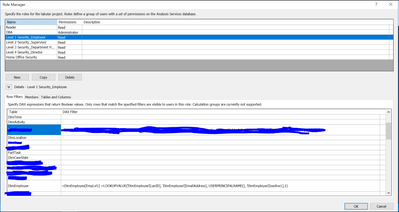
Thank you for the response. This is what I can see, which shows me there must be some kind of RLS possible with Azure but it's not actively filtering the data based on the user's login. Lookin gat the syntax this would work in an on-premises PBI model, so I wanted to know what the difference is. The below is an example of an employee's RLS.
Check out the May 2026 Power BI update to learn about new features.
Sign up to receive a private message when registration opens and key events begin.
If you have recently started exploring Fabric, we'd love to hear how it's going. Your feedback can help with product improvements.
| User | Count |
|---|---|
| 14 | |
| 10 | |
| 10 | |
| 7 | |
| 7 |
| User | Count |
|---|---|
| 37 | |
| 32 | |
| 28 | |
| 22 | |
| 20 |