cancel
Showing results for 
Search instead for 
Did you mean: 

July 7 - July 17 | Round 2 of the Power BI Dataviz World Championships. Don't miss your chance! Learn more

Reply
Anonymous
Not applicable

How to Implement Row Level Security with Azure Data Lake

Hello,


I'm not sure if this is the correct location for this question but I have struggled to find documentation anywhere on how exactly to set up RLS when connected to Azure Data Lake. Is the syntax used exactly the same as what's used in on-premises dataset PBI files?

For example, below would be an example of a role we have set up within our on-prem:

[EmployeeName] = LOOKUPVALUE('EmployeeTable'[EmployeeName], 'EmployeeTable'[EmailAddress], USERPRINCIPALNAME())


This RLS DAX code is what's used within our RLS for Azure but business users are stating that they're able to see everything, not data specific to them as intended.


Are there extra settings that need to be performed within the PBI service to ensure the security filtering is activated? Or anything else that needs to be done beforehand?

3 REPLIES 3
GilbertQ
Super User
Super User

Hi there

You have to ensure that your underlying dataset is able to correctly show data based on a logged in user.

As far as I am aware Azure Data Lake is not capable of doing this?


Did I answer your question? Mark my post as a solution!

Proud to be a Super User!


Power BI Blog

Anonymous
Not applicable

Hello,


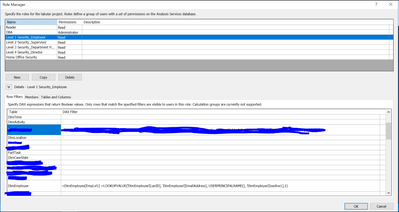
Thank you for the response. This is what I can see, which shows me there must be some kind of RLS possible with Azure but it's not actively filtering the data based on the user's login. Lookin gat the syntax this would work in an on-premises PBI model, so I wanted to know what the difference is. The below is an example of an employee's RLS. 


HI_IM_THIBBY_0-1593438585708.png


Is your example use Azure Analysis Services?


Did I answer your question? Mark my post as a solution!

Proud to be a Super User!


Power BI Blog

Helpful resources

Announcements
FabCon and SQLCon Barcelona 2026

FabCon & SQLCon – Barcelona 2026

Join us in Barcelona for FabCon and SQLCon, the Fabric, Power BI, SQL, and AI community event. Save €200 with code FABCMTY200.

60 days of Data Days Carousel

Data Days 2026

Join Fabric Data Days 2026: 60 days of free live/on-demand sessions, challenges, study groups, and certification opportunities.

Power BI DataViz World Championships carousel

Power BI DataViz World Championships - June 2026

A new Power BI DataViz World Championship is coming this June! Don't miss out on submitting your entry.