cancel
Showing results for 
Search instead for 
Did you mean: 

Learn from the best! Meet the four finalists headed to the FINALS of the Power BI Dataviz World Championships! Register now

Reply
Anonymous
Not applicable

Help with a calculation.

have a table in Power BI called AZB in which there are individual INV_NUM and order numbers with multiples Statuses. I want to count the # statuses in each order and I want to extract orders with more than 2 Statuses and count and count the number of orders. Then I want to divide this number by the total # of orders. 

I have tried using the following calculation but it returns the toal number of orders. 

Count of Status > 2 = CALCULATE(DISTINCTCOUNT(v_000_AZB_COPYINVENTHDR[Order Num]), FILTER(v_000_AZB_COPYINVENTHDR, COUNT(v_000_AZB_COPYINVENTHDR[Status]) > 2))
 
Please help! 
2 REPLIES 2
edhans
Community Champion
Community Champion

Can you show your data per the instructions below? An order header table typically has one line per order, so I don't know how any can have more than 1 status.


How to get good help fast. Help us help you.

How To Ask A Technical Question If you Really Want An Answer

How to Get Your Question Answered Quickly - Give us a good and concise explanation
How to provide sample data in the Power BI Forum - Provide data in a table format per the link, or share an Excel/CSV file via OneDrive, Dropbox, etc.. Provide expected output using a screenshot of Excel or other image. Do not provide a screenshot of the source data. I cannot paste an image into Power BI tables.


Did I answer your question? Mark my post as a solution!
Did my answers help arrive at a solution? Give it a kudos by clicking the Thumbs Up!

DAX is for Analysis. Power Query is for Data Modeling


Proud to be a Super User!

MCSA: BI Reporting
Anonymous
Not applicable

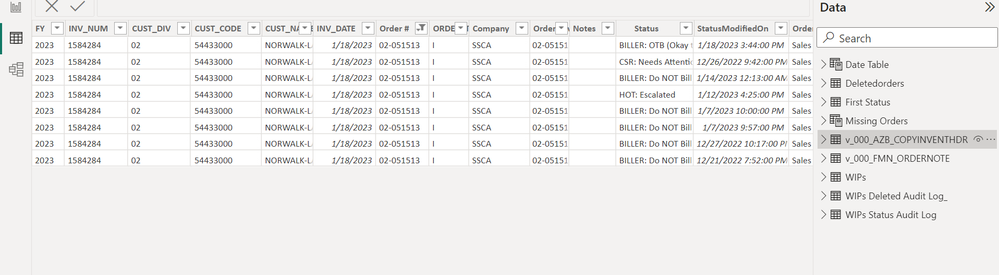
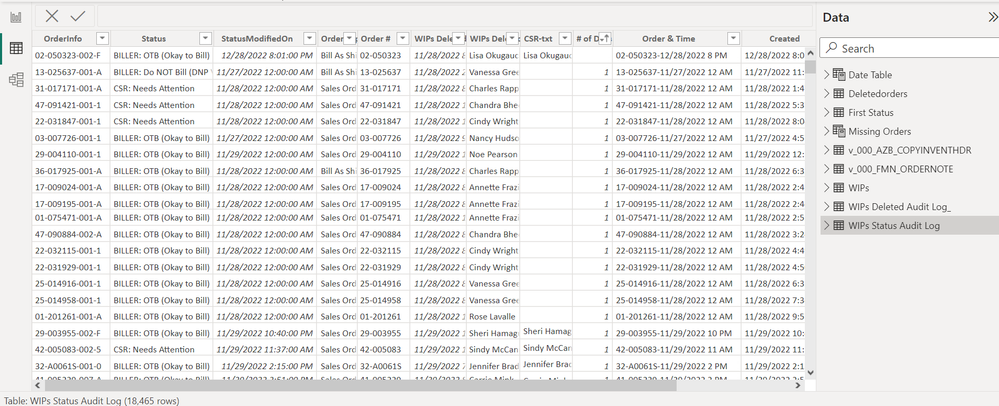
AZB example.PNGAudit Log Example.PNG

The first image is AZB. Each order can have multiple lines and invoices so I dedooped it on order + invoice number first because my client only wants the info on order numbers not the lines. Then I merged it with the Status from the Status Audit log in Power Query which is the second image. 


I made a SharePoint video but I am unable to share it here. @edhans Is there a way I can email it to you?

Helpful resources

Announcements
Join our Fabric User Panel

Join our Fabric User Panel

Share feedback directly with Fabric product managers, participate in targeted research studies and influence the Fabric roadmap.

February Power BI Update Carousel

Power BI Monthly Update - February 2026

Check out the February 2026 Power BI update to learn about new features.

FabCon Atlanta 2026 carousel

FabCon Atlanta 2026

Join us at FabCon Atlanta, March 16-20, for the ultimate Fabric, Power BI, AI and SQL community-led event. Save $200 with code FABCOMM.