cancel
Showing results for 
Search instead for 
Did you mean: 

The Power BI Data Visualization World Championships is back! Get ahead of the game and start preparing now! Learn more

Reply
chotu27
Post Patron
Post Patron

Handling Row Level Security

Hi,


I build row level security in power bi which is working fine as i expected.


But i wanted to display text field when someone  tries to access the report and his data is not available as "Your Information is not available"

1 ACCEPTED SOLUTION
v-kelly-msft
Community Support
Community Support

Hi @chotu27 ,


I have a solution for you,see below:

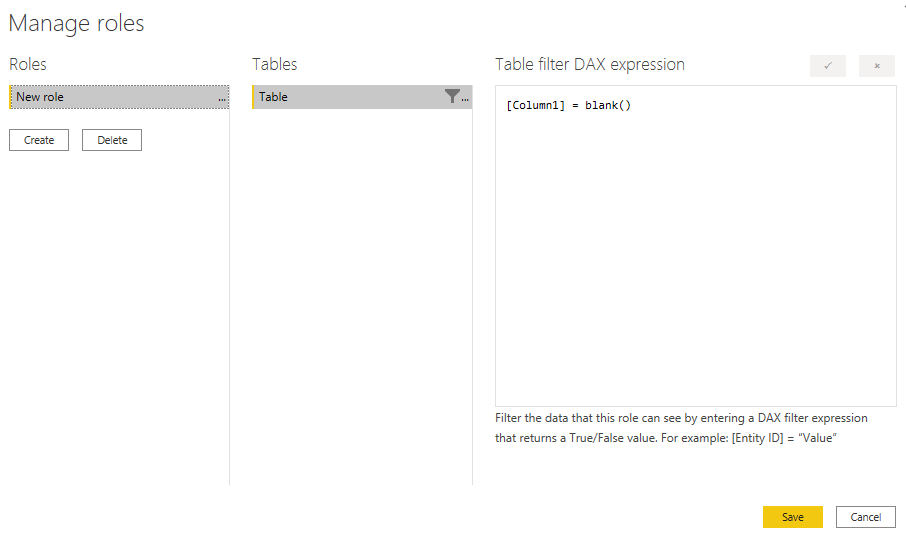
First manage roles as below:

Screenshot 2020-11-24 143444.png

Then create a measure as below:

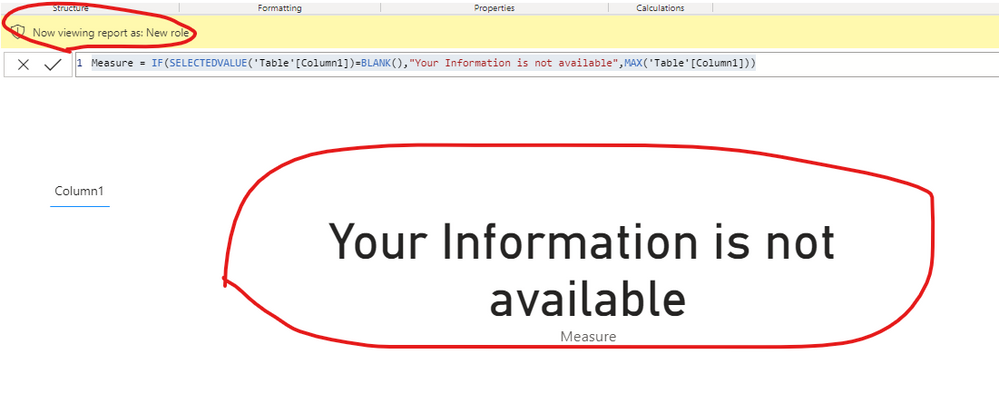
Measure = IF(SELECTEDVALUE('Table'[Column1])=BLANK(),"Your Information is not available",MAX('Table'[Column1]))

And you will see:

Screenshot 2020-11-24 143714.png


For the related .pbix file,you may see attached.


Best Regards,
Kelly

Did I answer your question? Mark my post as a solution!

View solution in original post

2 REPLIES 2
v-kelly-msft
Community Support
Community Support

Hi @chotu27 ,


I have a solution for you,see below:

First manage roles as below:

Screenshot 2020-11-24 143444.png

Then create a measure as below:

Measure = IF(SELECTEDVALUE('Table'[Column1])=BLANK(),"Your Information is not available",MAX('Table'[Column1]))

And you will see:

Screenshot 2020-11-24 143714.png


For the related .pbix file,you may see attached.


Best Regards,
Kelly

Did I answer your question? Mark my post as a solution!

collinq
Super User
Super User

Hi @chotu27 ,


I think that this is a good idea, but if a person can't see data, I would think that a message more similar to "Your permissions do not let you see this data" would be more effective.  That is because the message "Your information is not available" would make me think that there is a report problem, a Power BI problem or perhaps even a data source problem.  

I would suggest that you make an idea and post the link to it here as I would definitely vote for a message that said RLS was limiting a users ability to see a visual.

To do that yourself would require some sort of fancy conditional formatting AND, I am not quite positive that you even COULD do a conditional format on a RLS affected visual.  

I would appreciate Kudos if my response was helpful. I would also appreciate it if you would Mark this As a Solution if it solved the problem. Thanks!


Did I answer your question? Mark my post as a solution!

Proud to be a Datanaut!
Private message me for consulting or training needs.


Helpful resources

Announcements
Power BI DataViz World Championships

Power BI Dataviz World Championships

The Power BI Data Visualization World Championships is back! Get ahead of the game and start preparing now!

December 2025 Power BI Update Carousel

Power BI Monthly Update - December 2025

Check out the December 2025 Power BI Holiday Recap!

FabCon Atlanta 2026 carousel

FabCon Atlanta 2026

Join us at FabCon Atlanta, March 16-20, for the ultimate Fabric, Power BI, AI and SQL community-led event. Save $200 with code FABCOMM.