This time we’re going bigger than ever. Fabric, Power BI, SQL, AI and more. We're covering it all. You won't want to miss it.
Learn moreDid you hear? There's a new SQL AI Developer certification (DP-800). Start preparing now and be one of the first to get certified. Register now
Power BI Community,
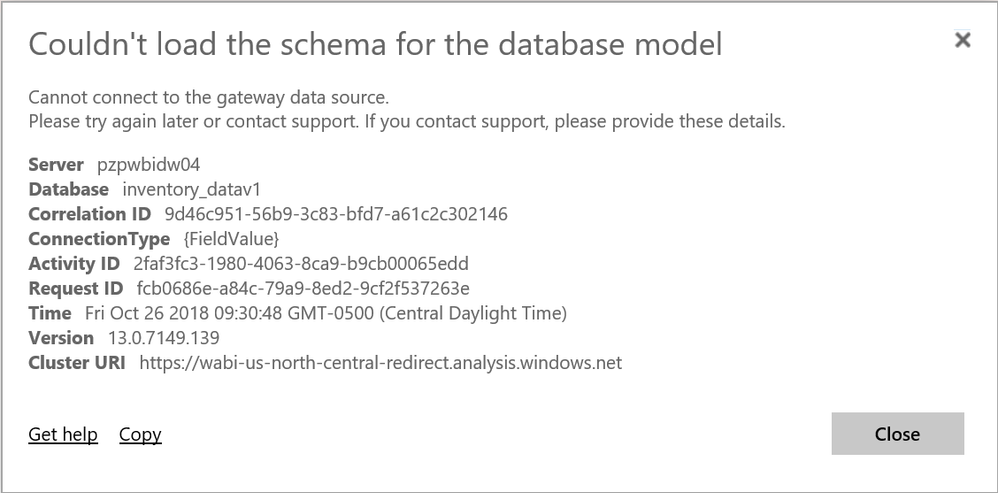
I recently published a dashboard into my workspace. However, I am getting the rejection shown below:
How would I resolve this issue?
Regards,
Gus Dahu
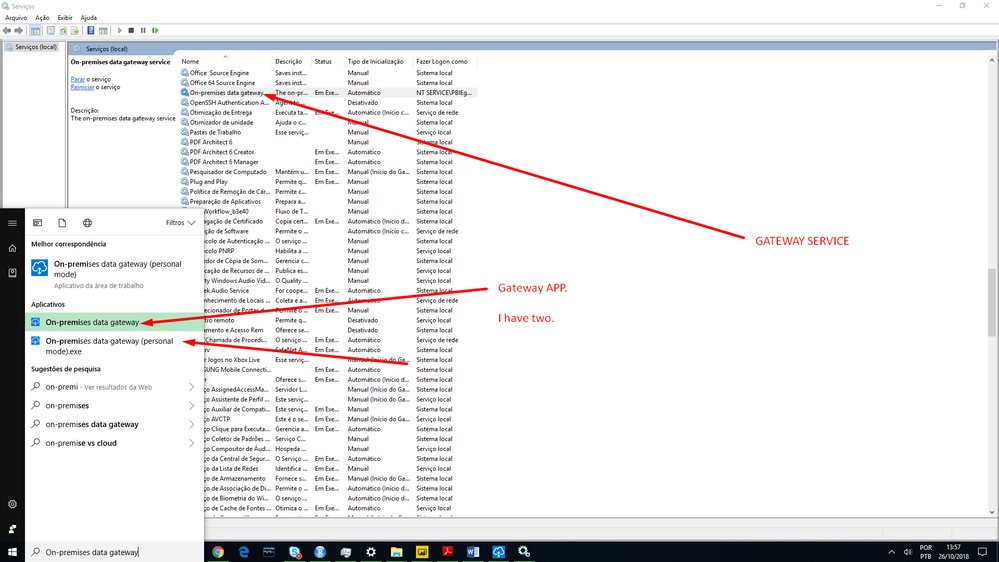
See in your computer if the gateway services is running.
Services>On-Premises data gateway, and iss if the status is Running or something like that.
Open the gateway app in your computer and see if is running and ok.
Hi rafaelmpsantos,
Thank you for your response.
Where/how do I access the gateway app located on my computer?
Regards,
Gus Dahu
only in windows menu type "on-premises" and it will appear
Hi rafaelmpsantos,
Do you mind sharing a screenshot showing this?
Regards,
Gus Dahu
Hi rafaelmpsantos,
It appears I don't have the "On-premise data gateway" installed on my pc. How would I obtain this application?
Regards,
Gus Dahu
If you don't have a gateway how do you update your dataset before?
Link Bellow
https://powerbi.microsoft.com/en-us/gateway/
Check out the April 2026 Power BI update to learn about new features.
Sign up to receive a private message when registration opens and key events begin.
If you have recently started exploring Fabric, we'd love to hear how it's going. Your feedback can help with product improvements.
| User | Count |
|---|---|
| 10 | |
| 8 | |
| 8 | |
| 8 | |
| 7 |
| User | Count |
|---|---|
| 49 | |
| 27 | |
| 24 | |
| 20 | |
| 20 |