Don't miss your chance to take the Fabric Data Engineer (DP-700) exam on us!
Learn moreWe've captured the moments from FabCon & SQLCon that everyone is talking about, and we are bringing them to the community, live and on-demand. Starts on April 14th. Register now
Hello,
I have a long list of account names that I have complied from several files into a data flow. I then applied the fuzzy group function to the entire list of accounts. Picture below for ref :
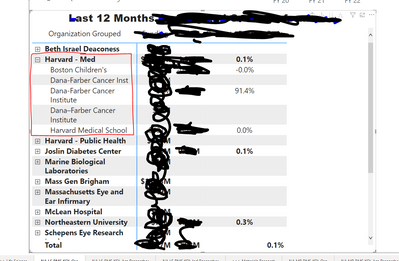
My question is how do I make use of the grouped account names? In power desktop there are data groups that I currently use to group these account names together. In the screenshot below you can see the harvard account name group highlighted in red>
My question is. Is there anyway to use fuzzy grouping to create these data groups inside my data flow or do I have to create the groups manually in the desktop version?
*please be gently am very new to data analytics and power bi.
Solved! Go to Solution.
Data Groups are done in the model, not in Power Query or source data.
If you wanted to group them in at Dataflow, you'd need to create a conditional column that would add the right grouping as another column.
if [field] = "Boston's Children" then "Harvard Med"
else if [field] = "something else" then "Harvard Public Health"
and so on.
I'd argue the conditional column is the better way from a modeling standpoint to approach it, but it is more tedious than data grouping drag and drop.
DAX is for Analysis. Power Query is for Data Modeling
Proud to be a Super User!
MCSA: BI ReportingData Groups are done in the model, not in Power Query or source data.
If you wanted to group them in at Dataflow, you'd need to create a conditional column that would add the right grouping as another column.
if [field] = "Boston's Children" then "Harvard Med"
else if [field] = "something else" then "Harvard Public Health"
and so on.
I'd argue the conditional column is the better way from a modeling standpoint to approach it, but it is more tedious than data grouping drag and drop.
DAX is for Analysis. Power Query is for Data Modeling
Proud to be a Super User!
MCSA: BI ReportingYeah I'm not sure either one of these options is feasible the list of accounts contains roughly 500k rows. Maybe I am better off using the built in ML modules to try and group the accounts, I've done at least a few thousand manually already that I could use as a potential training model.
You could create a list to merge and create your values, and a Fuzzy Merge is available which means you don't have to generate one for every 500K possible options.
DAX is for Analysis. Power Query is for Data Modeling
Proud to be a Super User!
MCSA: BI Reporting"You could create a list to merge" when you say create a list are you referring to making a transformation table?
Just saying create a list of items (not a Power Query "List") that could be pulled in and then a fuzzy merge done. For example, if you turned down the sensitivity in Fuzzy Merge, pretty much anything with Harvard in it would match and could be grouped to the Harvard section.
It is like all AI type features though. It may work 95-97% of the time, and the rest you have to keep adding exceptions for.
DAX is for Analysis. Power Query is for Data Modeling
Proud to be a Super User!
MCSA: BI ReportingIf you have recently started exploring Fabric, we'd love to hear how it's going. Your feedback can help with product improvements.
A new Power BI DataViz World Championship is coming this June! Don't miss out on submitting your entry.
Share feedback directly with Fabric product managers, participate in targeted research studies and influence the Fabric roadmap.
| User | Count |
|---|---|
| 29 | |
| 23 | |
| 17 | |
| 15 | |
| 14 |