cancel
Showing results for 
Search instead for 
Did you mean: 

Learn from the best! Meet the four finalists headed to the FINALS of the Power BI Dataviz World Championships! Register now

Reply
Shannon_Trick
New Member

Format a Measure

Hi,


I am fairly new to Power BI and I have created this measure:

2020-2021 Approved Budget minus Actuals Amount =
SUM('CurrentYearBudget'[2020-2021 Approved Budget]) - SUM('Actuals'[Actuals Amount])
 
I would like the value to display with a comma. Are you able to format this within a measure? So far I am not having success.
Thank you!
1 ACCEPTED SOLUTION
Anand24
Super User
Super User

Hi @Shannon_Trick ,


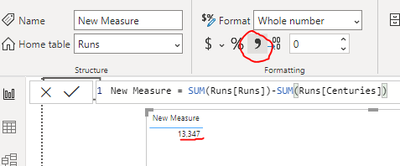
You just need to click on the comma from formatting for enabling the comma in your values:

comm.PNG


Give a thumbs up if this post helped you in any way and mark this post as solution if it solved your query !!!


View solution in original post

3 REPLIES 3
Anand24
Super User
Super User

Hi @Shannon_Trick ,


You just need to click on the comma from formatting for enabling the comma in your values:

comm.PNG


Give a thumbs up if this post helped you in any way and mark this post as solution if it solved your query !!!


lousegers
Resolver I
Resolver I

Hi @Shannon_Trick ,


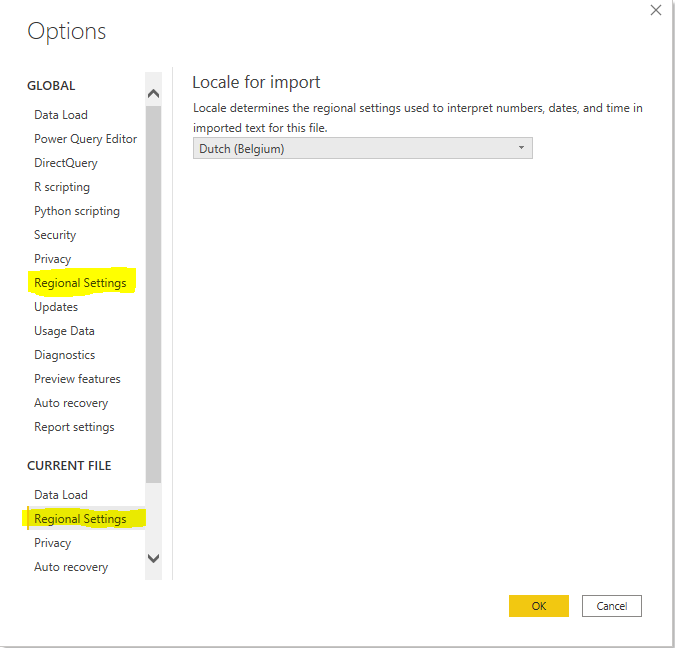
The display of numeric fields (and dates, times,.. ) depends on your Regional Settings.


It can be adjusted in Power BI Desktop or in Windows (Land/Region). It looks like the Windows setting is leading, but you have to close and reopen your pbix file after adjusting the Regional Settings. Just navigate to File > Options and settings > Options.

To avoid this from happening in the future, I would advice to change this for both your current file as globally (new .pbix files).

You can set it to Dutch in your case as decimals will be preceded with a comma instead of a default dot.


Capture.PNG


Was my answer anywhere helpful?

Show your appreciation by simply marking my reply as solution or throw it a kudo.


Hop on the data train and get connected @LouSegers


Thanks so much - I'll give it a try.

Helpful resources

Announcements
Join our Fabric User Panel

Join our Fabric User Panel

Share feedback directly with Fabric product managers, participate in targeted research studies and influence the Fabric roadmap.

February Power BI Update Carousel

Power BI Monthly Update - February 2026

Check out the February 2026 Power BI update to learn about new features.

FabCon Atlanta 2026 carousel

FabCon Atlanta 2026

Join us at FabCon Atlanta, March 16-20, for the ultimate Fabric, Power BI, AI and SQL community-led event. Save $200 with code FABCOMM.