Join us at FabCon Atlanta from March 16 - 20, 2026, for the ultimate Fabric, Power BI, AI and SQL community-led event. Save $200 with code FABCOMM.
Register now!The Power BI Data Visualization World Championships is back! Get ahead of the game and start preparing now! Learn more
Hi,
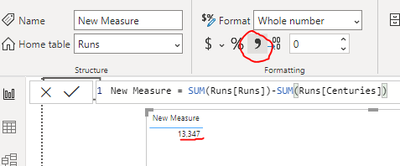
I am fairly new to Power BI and I have created this measure:
Solved! Go to Solution.
Hi @Shannon_Trick ,
You just need to click on the comma from formatting for enabling the comma in your values:
Give a thumbs up if this post helped you in any way and mark this post as solution if it solved your query !!!
Hi @Shannon_Trick ,
You just need to click on the comma from formatting for enabling the comma in your values:
Give a thumbs up if this post helped you in any way and mark this post as solution if it solved your query !!!
Hi @Shannon_Trick ,
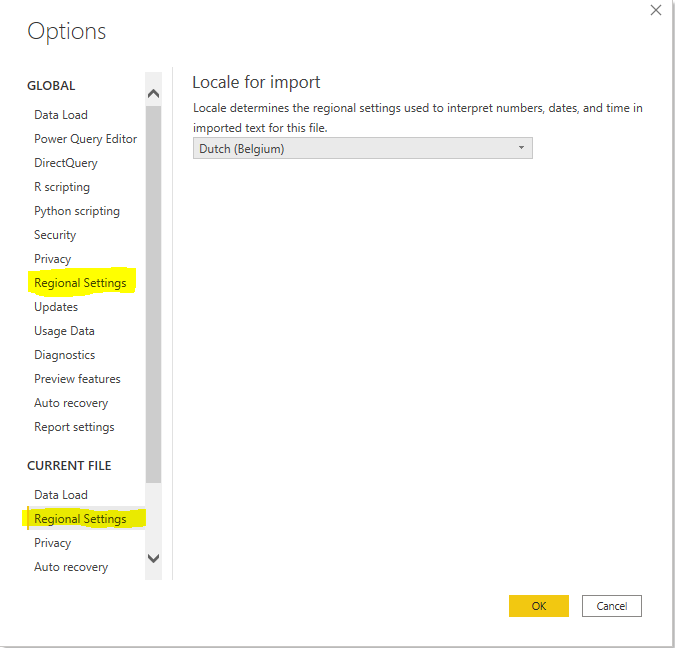
The display of numeric fields (and dates, times,.. ) depends on your Regional Settings.
It can be adjusted in Power BI Desktop or in Windows (Land/Region). It looks like the Windows setting is leading, but you have to close and reopen your pbix file after adjusting the Regional Settings. Just navigate to File > Options and settings > Options.
To avoid this from happening in the future, I would advice to change this for both your current file as globally (new .pbix files).
You can set it to Dutch in your case as decimals will be preceded with a comma instead of a default dot.
Was my answer anywhere helpful?
Show your appreciation by simply marking my reply as solution or throw it a kudo.
Hop on the data train and get connected @LouSegers
Thanks so much - I'll give it a try.
The Power BI Data Visualization World Championships is back! Get ahead of the game and start preparing now!