cancel
Showing results for 
Search instead for 
Did you mean: 

Try your skills in the Power BI Dataviz World Championship! Round one ends June 26. Join now

Reply
pjuvalainen
Frequent Visitor

Fixing Infringed embed codes

Hello


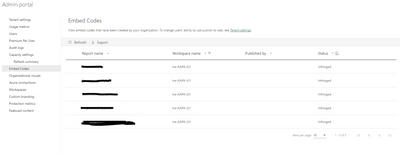
Is it possible to fix infringed embed codes?  Reports have been published to web and they have worked until a person who made those embed codes have left our organization.  I can found those links as a Admin but I cannot do anything to them.  Only thing that I can do, is delete current codes and create them again and update those new links to our website.  Is this really only way to correct this?


I put myself as a admin in a workspace and it did not help.  I also checked tenant settings and they should be correct.


pjuvalainen_0-1675854126020.png


1 REPLY 1
ibarrau
Super User
Super User

Hi. Infringed means: The embed code is outside the defined tenant policy. This status typically occurs when an embed code was created and then the Publish to web tenant setting was changed to exclude the user owning the embed code. If the tenant setting is disabled, or the user is no longer allowed to create embed codes, existing embed codes show an Infringed status. 

Please check your tenant settings about Publish to Web to change that.

You can read more about status of published to web codes in here: https://learn.microsoft.com/en-us/power-bi/collaborate-share/service-publish-to-web#understanding-th...

I hope that helps,


If this post helps, then please consider Accept it as the solution to help the other members find it more quickly.

Happy to help!

LaDataWeb Blog

Helpful resources

Announcements
Fabric Data Days is here Carousel

Fabric Data Days 2026

Don't miss out on Data Days, June 15 through August 7. Learn Fabric, Power BI, SQL, AI and more.

Power BI DataViz World Championships carousel

Power BI DataViz World Championships - June 2026

A new Power BI DataViz World Championship is coming this June! Don't miss out on submitting your entry.