Don't miss your chance to take the Fabric Data Engineer (DP-600) exam for FREE! Find out how by watching the DP-600 session on-demand now through April 28th.
Learn moreJoin the FabCon + SQLCon recap series. Up next: Power BI, Real-Time Intelligence, IQ and AI, and Data Factory take center stage. All sessions are available on-demand after the live show. Register now
Hello
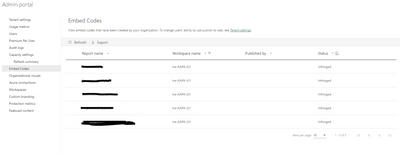
Is it possible to fix infringed embed codes? Reports have been published to web and they have worked until a person who made those embed codes have left our organization. I can found those links as a Admin but I cannot do anything to them. Only thing that I can do, is delete current codes and create them again and update those new links to our website. Is this really only way to correct this?
I put myself as a admin in a workspace and it did not help. I also checked tenant settings and they should be correct.
Hi. Infringed means: The embed code is outside the defined tenant policy. This status typically occurs when an embed code was created and then the Publish to web tenant setting was changed to exclude the user owning the embed code. If the tenant setting is disabled, or the user is no longer allowed to create embed codes, existing embed codes show an Infringed status.
Please check your tenant settings about Publish to Web to change that.
You can read more about status of published to web codes in here: https://learn.microsoft.com/en-us/power-bi/collaborate-share/service-publish-to-web#understanding-th...
I hope that helps,
Happy to help!
Check out the April 2026 Power BI update to learn about new features.
If you have recently started exploring Fabric, we'd love to hear how it's going. Your feedback can help with product improvements.
A new Power BI DataViz World Championship is coming this June! Don't miss out on submitting your entry.
| User | Count |
|---|---|
| 9 | |
| 8 | |
| 8 | |
| 8 | |
| 7 |
| User | Count |
|---|---|
| 37 | |
| 29 | |
| 26 | |
| 19 | |
| 19 |