Join us at FabCon Atlanta from March 16 - 20, 2026, for the ultimate Fabric, Power BI, AI and SQL community-led event. Save $200 with code FABCOMM.
Register now!The Power BI Data Visualization World Championships is back! Get ahead of the game and start preparing now! Learn more
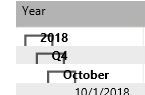
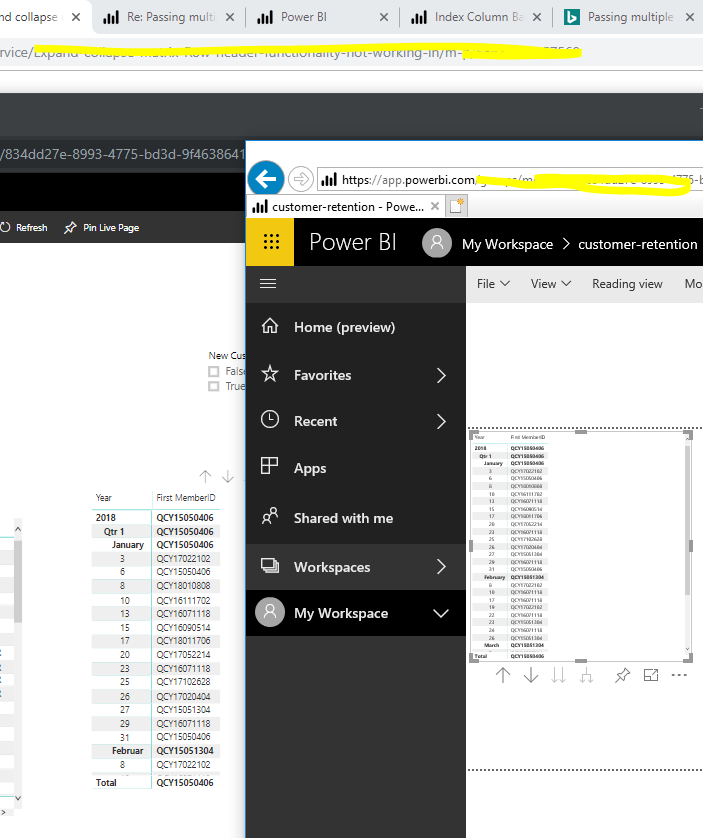
The new Expand/Collapse for matrix functionality with the new Nov release of Power BI is buggy. Works fine in Chrome. Is there any IE setting i need to change?
Solved! Go to Solution.
Hi @sharath459,
Based on my test, I cannot reproduce your issue by using the Power BI desktop version: 2.64.5285.461 64-bit (November 2018). Could you please update your desktop and try again? If any other question, feel free to let me know please.
Regards,
Frank
Hi @sharath459,
Based on my test, I cannot reproduce your issue by using the Power BI desktop version: 2.64.5285.461 64-bit (November 2018). Could you please update your desktop and try again? If any other question, feel free to let me know please.
Regards,
Frank
Hi @sharath459,
Has your issue been solved? If so, kindly mark my answer as a solution to close the case. If any other question, feel free to let me know please.
Regards,
Frank
Hi @v-frfei-msft,
We are experiencing the same issue with the rendering of the expand/collapse buttons in IE as the OP, as well as the new Filter pane.
We are using Power BI Desktop version 2.64.5285.741 64-bit (November 2018) and Internet Explorer version 11.2068.14393.0.
We have managed to reproduce this behaviour on two seperate reports using two diffent user's My Workspaces.
The same issue is not present in Chrome or MS Edge, but unfortunately our organisation has standardised on IE.
Regards,
Gert
The Power BI Data Visualization World Championships is back! Get ahead of the game and start preparing now!
| User | Count |
|---|---|
| 56 | |
| 55 | |
| 32 | |
| 18 | |
| 14 |