cancel
Showing results for 
Search instead for 
Did you mean: 

Vote for your favorite vizzies from the Power BI Dataviz World Championship submissions. Vote now!

Reply
Arnoh
Helper III
Helper III

update app

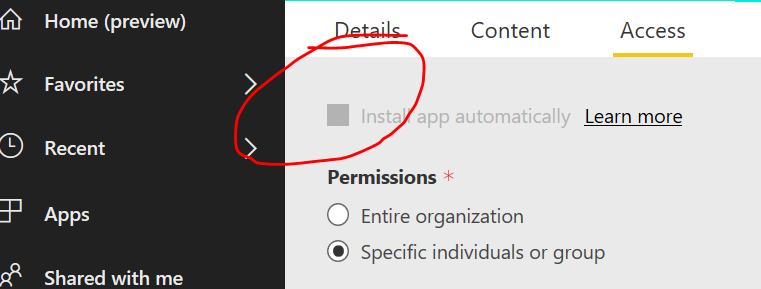
When you update your app you have an option install app automatically. 

Can anyone help me how to enable this option? 

Thanx


Knipsel.PNG

1 ACCEPTED SOLUTION
v-yuta-msft
Community Support
Community Support

Hi Arnoh,


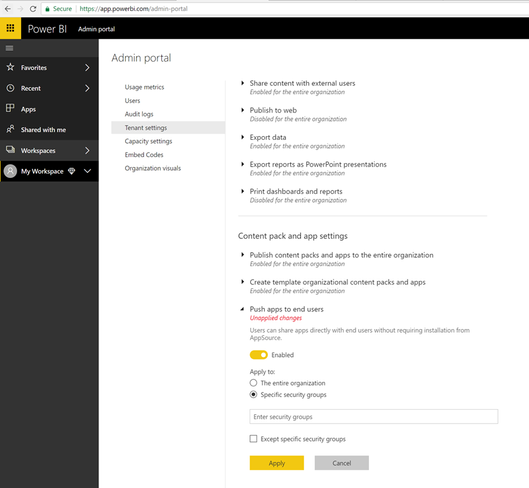
This feature should be enabled by your admin. This is done in the admin portal (part of the Power BI service) on the Tenant settings tab.

a1317b58-e854-4d97-b041-77d87cea8e01.png 

Switch the setting to Enabled and then specify who gets this capability (entire org or specific security groups). Remember that tenant setting changes can take some time to take effect, usually around 15 minutes.


Regards,

Jimmy Tao

View solution in original post

1 REPLY 1
v-yuta-msft
Community Support
Community Support

Hi Arnoh,


This feature should be enabled by your admin. This is done in the admin portal (part of the Power BI service) on the Tenant settings tab.

a1317b58-e854-4d97-b041-77d87cea8e01.png 

Switch the setting to Enabled and then specify who gets this capability (entire org or specific security groups). Remember that tenant setting changes can take some time to take effect, usually around 15 minutes.


Regards,

Jimmy Tao

Helpful resources

Announcements
Power BI DataViz World Championships

Power BI Dataviz World Championships

Vote for your favorite vizzies from the Power BI World Championship submissions!

Sticker Challenge 2026 Carousel

Join our Community Sticker Challenge 2026

If you love stickers, then you will definitely want to check out our Community Sticker Challenge!

January Power BI Update Carousel

Power BI Monthly Update - January 2026

Check out the January 2026 Power BI update to learn about new features.

FabCon Atlanta 2026 carousel

FabCon Atlanta 2026

Join us at FabCon Atlanta, March 16-20, for the ultimate Fabric, Power BI, AI and SQL community-led event. Save $200 with code FABCOMM.