cancel
Showing results for 
Search instead for 
Did you mean: 

The Power BI Data Visualization World Championships is back! Get ahead of the game and start preparing now! Learn more

Reply
robarivas
Post Patron
Post Patron

Error when checking Access to a Report

Receiving this strange error whenever I check to see who has access to a report I've published to Power BI Service:


Something went wrong
Failed to get access info for this artifact.
Please try again later or contact support. If you contact support, please provide these details.
Activity ID: eb765288-9184-4859-9739-cbde2001feee
Request ID: e3fb363e-e3fe-3f70-4757-4139c00df128
Correlation ID: 2d2f866e-74ce-ccbd-0ca7-3f0096f15e81
Time: Wed Feb 06 2019 10:42:57 GMT-0500 (Eastern Standard Time)
Version: 13.0.8234.157
Cluster URI: https://wabi-us-east2-redirect.analysis.windows.net

1 ACCEPTED SOLUTION
JohnJ2
Regular Visitor

Having the same problem.  I went to share the report, and clicked on the "Access" link.  Upon receiving the error screen, I clicked "ok" (or cancel, or whatever it was) and then at the bottom, clicked "Manage Permissions".  Within this list of people, there was a blank entry.  I clicked the "..." of the blank entry and selected "Remove Access".  Once that blank entry was removed, I was able to open the "Access" screen for the report.

View solution in original post

4 REPLIES 4
JohnJ2
Regular Visitor

Having the same problem.  I went to share the report, and clicked on the "Access" link.  Upon receiving the error screen, I clicked "ok" (or cancel, or whatever it was) and then at the bottom, clicked "Manage Permissions".  Within this list of people, there was a blank entry.  I clicked the "..." of the blank entry and selected "Remove Access".  Once that blank entry was removed, I was able to open the "Access" screen for the report.

Thank you! This worked for me too. Seems like a bug to me. powerbi.com should give us more direction as to what might be wrong.

Perfect!! @JohnJ2 You nailed it!! Thanks so much!!

v-cherch-msft
Microsoft Employee
Microsoft Employee

Hi @robarivas


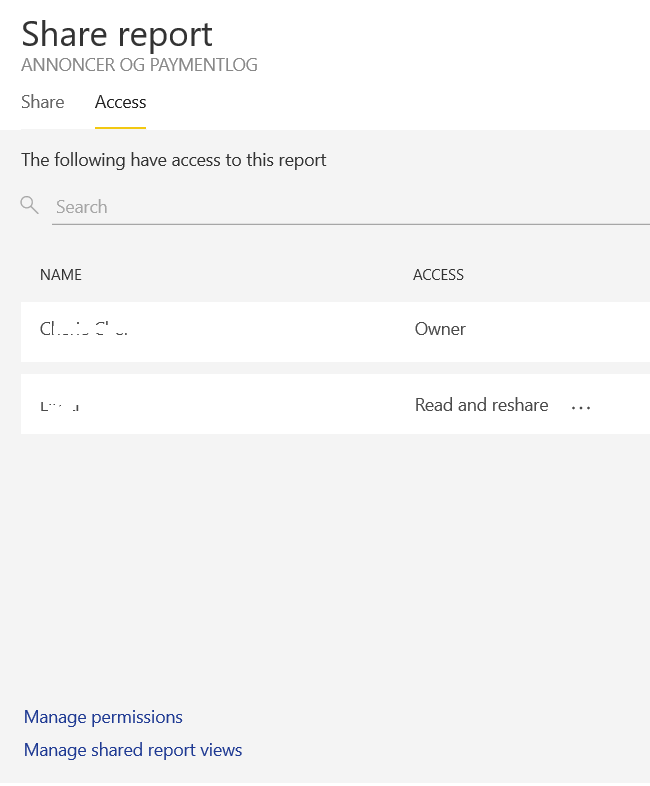
Based on my test,i cannot reproduce the same issue.I would suggest you clear the cookies and sign in again to test.Try with IE or Edge or Google Chrome.

1.png

Regards,

Cherie

Community Support Team _ Cherie Chen
If this post helps, then please consider Accept it as the solution to help the other members find it more quickly.

Helpful resources

Announcements
Power BI DataViz World Championships

Power BI Dataviz World Championships

The Power BI Data Visualization World Championships is back! Get ahead of the game and start preparing now!

December 2025 Power BI Update Carousel

Power BI Monthly Update - December 2025

Check out the December 2025 Power BI Holiday Recap!

FabCon Atlanta 2026 carousel

FabCon Atlanta 2026

Join us at FabCon Atlanta, March 16-20, for the ultimate Fabric, Power BI, AI and SQL community-led event. Save $200 with code FABCOMM.