Hi All,
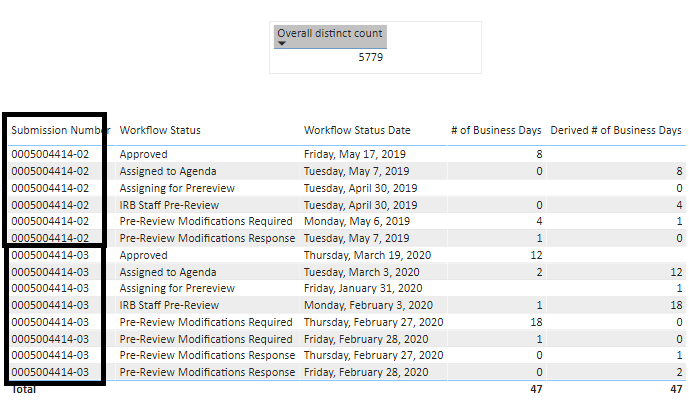
I have a requirement to calculate the average for my data as below. Directly using the average is not giving me the right results. Data is:
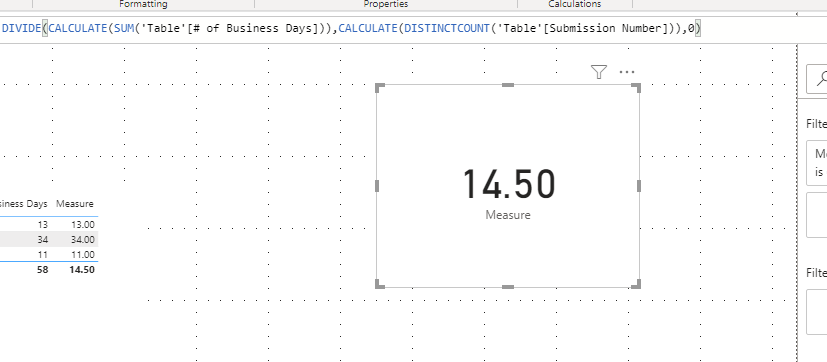
 Requirement is to calculate the average of "# of business days", so the logic to be used is sum of( "# of business days") divided by (unique "Submission Number").
From the example above, number of unique submission number =4 and sum of # of business days=58, the result should be 58 divided by 4=14.5.
I have used the below logic
created measure , 1. sum = sum(business days) and 2. count = distinctcount(submission numbers).
My overall dataset has 5779 unique submission numbers, I am filtering my data for 4 submission numbers as shown above, but the count of submission numbers still remains 5779 , expected data should be 4, due to which the average calucation is going wrong.
I have slicers addded for different fields shown in the data above, based on the selections I make, the count of submission numbers should change dynamically but it always shows as 5779 for me.
Can someone please let me know how to fix.
Sample data after filtering:
Please use the below data, overall submission numbers=5
out of this, if i filter the data as above screenshot, the submission numbers should be 4 and average should be 58/4.
| Submission Number | Admin | PI | Submission type | Submission Status | Board Name | Review Category | Workflow Status | Workflow Status Date | Department | Division | # of Business Days |
| 0005004414-02 | | | Amendment | Approved | Expedited | Expedited | Assigning for Prereview | 4/30/2019 | | | |
| 0005004414-02 | | | Amendment | Approved | Expedited | Expedited | Staff Pre-Review | 4/30/2019 | | | 0 |
| 0005004414-02 | | | Amendment | Approved | Expedited | Expedited | Pre-Review Modifications Required | 5/6/2019 | | | 4 |
| 0005004414-02 | | | Amendment | Approved | Expedited | Expedited | Pre-Review Modifications Response | 5/7/2019 | | | 1 |
| 0005004414-02 | | | Amendment | Approved | Expedited | Expedited | Assigned to Agenda | 5/7/2019 | | | 0 |
| 0005004414-02 | | | Amendment | Approved | Expedited | Expedited | Approved | 5/17/2019 | | | 8 |
| 0005004414-03 | | | Continuing Review | Approved | Expedited | Expedited | Assigning for Prereview | 1/31/2020 | | | |
| 0005004414-03 | | | Continuing Review | Approved | Expedited | Expedited | Staff Pre-Review | 2/3/2020 | | | 1 |
| 0005004414-03 | | | Continuing Review | Approved | Expedited | Expedited | Pre-Review Modifications Required | 2/27/2020 | | | 18 |
| 0005004414-03 | | | Continuing Review | Approved | Expedited | Expedited | Pre-Review Modifications Response | 2/27/2020 | | | 0 |
| 0005004414-03 | | | Continuing Review | Approved | Expedited | Expedited | Pre-Review Modifications Required | 2/28/2020 | | | 1 |
| 0005004414-03 | | | Continuing Review | Approved | Expedited | Expedited | Pre-Review Modifications Response | 2/28/2020 | | | 0 |
| 0005004414-03 | | | Continuing Review | Approved | Expedited | Expedited | Assigned to Agenda | 3/3/2020 | | | 2 |
| 0005004414-03 | | | Continuing Review | Approved | Expedited | Expedited | Approved | 3/19/2020 | | | 12 |
| 0007004497-01 | | | Continuing Review | Approved | Expedited | Expedited | Assigning for Prereview | 5/30/2019 | | | |
| 0007004497-01 | | | Continuing Review | Approved | Expedited | Expedited | Staff Pre-Review | 5/30/2019 | | | 0 |
| 0007004497-01 | | | Continuing Review | Approved | Expedited | Expedited | Assigned to Agenda | 6/6/2019 | | | 5 |
| 0007004497-01 | | | Continuing Review | Approved | Expedited | Expedited | Approved | 6/14/2019 | | | 6 |
| 0007004497-02 | | | Continuing Review | Approved | Expedited | Expedited | Assigning for Prereview | 5/8/2020 | | | |
| 0007004497-09 | | | Continuing Review | Approved | Expedited | Expedited | Assigning for Prereview | 5/8/2020 | | | 15 |
| 0007004497-09 | | | Continuing Review | Approved | Expedited | Expedited | Assigning for Prereview | 5/8/2020 | | | 1 |
Thank you,
Poojitha