cancel
Showing results for 
Search instead for 
Did you mean: 

Did you hear? There's a new SQL AI Developer certification (DP-800). Start preparing now and be one of the first to get certified. Register now

Reply
AnneGupta
Frequent Visitor

Duplicate Columns Automatically Added

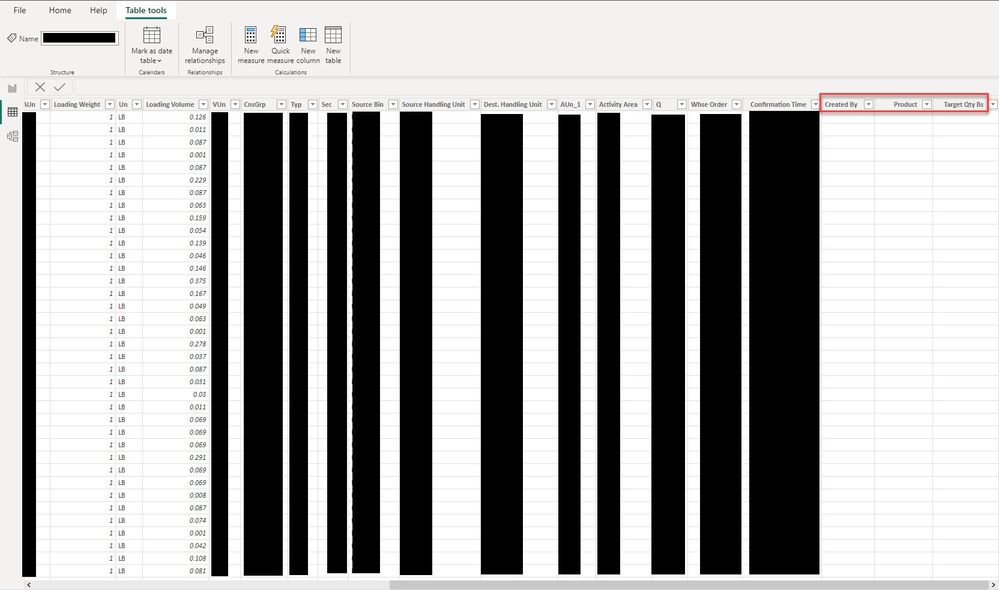
New-ish to Power BI so forgive my ignorance. I imported 12 .txt files with a year's worth of data into Power BI. I appended the queries as they were all formatted the same (or so I thought) as I wanted all of the information in one set. After they were appended, I saw that Power BI had added 3 columns at the end of the set, which are duplicates of other columns in the data. Power BI took the data from the original columns and pushed it out to these added columns, but not for every line. I cannot figure out why this happened, with these 3 columns, which are not consecutive. Looking at these 12 sources on their own in Power BI, the columns aren't added, so something happens when I append them. What could cause this? A suggestion I received was that it could be something to do with the delimiters in the file where it seems to be  happening (1 specific month seems to be the culprit) but when I open the source file, nothing looks off to me, as compared to the other 11 files. Any suggestions on how to figure out the problem and correct it? Picture shows extra columns circled in red.Power BI Example.jpg
1 ACCEPTED SOLUTION
v-yanjiang-msft
Community Support
Community Support

Hi @AnneGupta ,

This always happen when the column names are not exactly the same. I notice that there is a space before the "Product" column, is this the same in all files? Please also check that there is no space after the column name.

Here's the same problem with you: Solved: Append Query duplicates some columns - Microsoft Power BI Community


Best regards,

Community Support Team_kalyj

If this post helps, then please consider Accept it as the solution to help the other members find it more quickly.

View solution in original post

1 REPLY 1
v-yanjiang-msft
Community Support
Community Support

Hi @AnneGupta ,

This always happen when the column names are not exactly the same. I notice that there is a space before the "Product" column, is this the same in all files? Please also check that there is no space after the column name.

Here's the same problem with you: Solved: Append Query duplicates some columns - Microsoft Power BI Community


Best regards,

Community Support Team_kalyj

If this post helps, then please consider Accept it as the solution to help the other members find it more quickly.

Helpful resources

Announcements
April Power BI Update Carousel

Power BI Monthly Update - April 2026

Check out the April 2026 Power BI update to learn about new features.

Fabric SQL PBI Data Days

Data Days 2026 coming soon!

Sign up to receive a private message when registration opens and key events begin.

New to Fabric survey Carousel

New to Fabric Survey

If you have recently started exploring Fabric, we'd love to hear how it's going. Your feedback can help with product improvements.

Power BI DataViz World Championships carousel

Power BI DataViz World Championships - June 2026

A new Power BI DataViz World Championship is coming this June! Don't miss out on submitting your entry.