Share feedback directly with Fabric product managers, participate in targeted research studies and influence the Fabric roadmap.
Sign up nowGet Fabric certified for FREE! Don't miss your chance! Learn more
Hello friends.
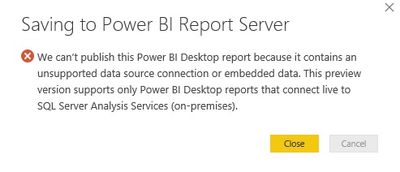
Currently I am getting an error when saving to the PowerBI Server
Will the PR support it?
Thanks
Michael
Solved! Go to Solution.
@Anonymous
Currentlly, Power BI Desktop (SQL Server Reporting Services) only supports Analysis Services with live connection. See: Quickstart: Create a Power BI report for Power BI Report Server.
It will support other data source later this year. See comments in: Introducing Power BI Report Server for on-premises Power BI report publishing
Regards,
Is this still the case? I still cannot upload a pbi with a direct query to Snowflake
An info, Power BI report server is available only for Power BI Premium, is right ? thanks
bump
https://powerbi.microsoft.com/en-us/documentation/reportserver-install-report-server/
Power BI Premium *or* SQL Server Enterprise SA agreement
@Anonymous
Currentlly, Power BI Desktop (SQL Server Reporting Services) only supports Analysis Services with live connection. See: Quickstart: Create a Power BI report for Power BI Report Server.
It will support other data source later this year. See comments in: Introducing Power BI Report Server for on-premises Power BI report publishing
Regards,
Is this still true (only direct query through an AS live connection), or can you go directly to the source?
If you love stickers, then you will definitely want to check out our Community Sticker Challenge!
Check out the January 2026 Power BI update to learn about new features.
| User | Count |
|---|---|
| 18 | |
| 7 | |
| 7 | |
| 7 | |
| 7 |
| User | Count |
|---|---|
| 49 | |
| 45 | |
| 25 | |
| 25 | |
| 23 |