Join us at FabCon Atlanta from March 16 - 20, 2026, for the ultimate Fabric, Power BI, AI and SQL community-led event. Save $200 with code FABCOMM.
Register now!The Power BI Data Visualization World Championships is back! It's time to submit your entry. Live now!
Hello friends.
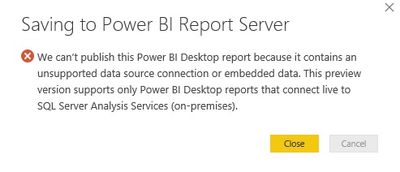
Currently I am getting an error when saving to the PowerBI Server
Will the PR support it?
Thanks
Michael
Solved! Go to Solution.
@Anonymous
Currentlly, Power BI Desktop (SQL Server Reporting Services) only supports Analysis Services with live connection. See: Quickstart: Create a Power BI report for Power BI Report Server.
It will support other data source later this year. See comments in: Introducing Power BI Report Server for on-premises Power BI report publishing
Regards,
Is this still the case? I still cannot upload a pbi with a direct query to Snowflake
An info, Power BI report server is available only for Power BI Premium, is right ? thanks
bump
https://powerbi.microsoft.com/en-us/documentation/reportserver-install-report-server/
Power BI Premium *or* SQL Server Enterprise SA agreement
@Anonymous
Currentlly, Power BI Desktop (SQL Server Reporting Services) only supports Analysis Services with live connection. See: Quickstart: Create a Power BI report for Power BI Report Server.
It will support other data source later this year. See comments in: Introducing Power BI Report Server for on-premises Power BI report publishing
Regards,
Is this still true (only direct query through an AS live connection), or can you go directly to the source?
| User | Count |
|---|---|
| 21 | |
| 13 | |
| 8 | |
| 6 | |
| 4 |
| User | Count |
|---|---|
| 50 | |
| 43 | |
| 39 | |
| 13 | |
| 12 |