cancel
Showing results for 
Search instead for 
Did you mean: 

Learn from the best! Meet the four finalists headed to the FINALS of the Power BI Dataviz World Championships! Register now

Reply
VimWan
Frequent Visitor

Do Data Flows Transfer between Workspaces?

Hi Everyone,


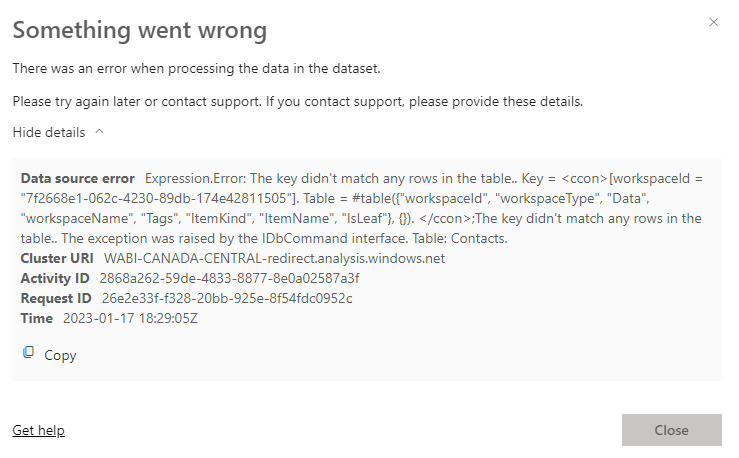
Another Team at my office created a Power BI dashboard for our team a while ago and I'm looking to get it up and running in our workspace. I have the pbix file which I uploaded to our workspace but when I refresh the data source on desktop or service I get the following error message:

workflow error message.PNG


I'm coming to understand that the data was sourced and transformed via a Power BI dataflow, and that the workspace the dataflow was created in by the other team was deleted or changed and so when although the pbix file is provided to us, the dataflow still needs to be migrated to our workspace.


Am I understanding this right?

Thanks for anyones help in advance.

1 ACCEPTED SOLUTION

The premium workspace part won't be the issue as that only really becomes a problem later when you are trying to refresh online.


If it's on the second step then it looks like it isn't finding the dataflow you are looking for. It could be that you don't have access to the workspace or that the dataflow has been deleted/moved.

View solution in original post

3 REPLIES 3
VimWan
Frequent Visitor

Hi Chris,


Thanks for your response.

Either of the first 2 options are very possible, which I'm going to look into.

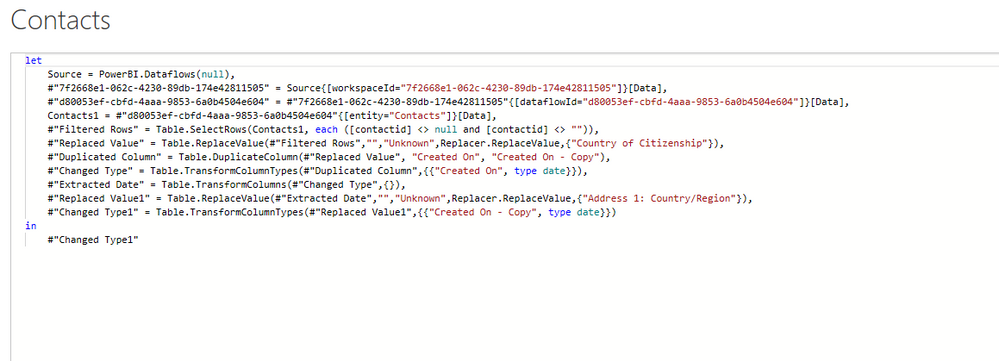
Like you said, the error is coming from the data sourcing step in the second line which is looking at a dataflow. 

contacts - advanced editor.PNG


Can we assume that either of the first 2 scenarios you mentioned is what is causing this then?

The premium workspace part won't be the issue as that only really becomes a problem later when you are trying to refresh online.


If it's on the second step then it looks like it isn't finding the dataflow you are looking for. It could be that you don't have access to the workspace or that the dataflow has been deleted/moved.

chris88
Frequent Visitor

You can have dataflows from different workspaces as long as you have access to them and they are not on a premium workspace trying to be used in a report on a non premium workspace.


Your error above is coming from the 'Contacts' table and is pretty much saying it can't find what your looking for somewhere along the line. Have you opened the contacts table in Power Query to see where the error is stemming from?

Helpful resources

Announcements
New to Fabric survey Carousel

New to Fabric Survey

If you have recently started exploring Fabric, we'd love to hear how it's going. Your feedback can help with product improvements.

Power BI DataViz World Championships carousel

Power BI DataViz World Championships - June 2026

A new Power BI DataViz World Championship is coming this June! Don't miss out on submitting your entry.

Join our Fabric User Panel

Join our Fabric User Panel

Share feedback directly with Fabric product managers, participate in targeted research studies and influence the Fabric roadmap.

March Power BI Update Carousel

Power BI Community Update - March 2026

Check out the March 2026 Power BI update to learn about new features.

Top Kudoed Authors