cancel
Showing results for 
Search instead for 
Did you mean: 

Join the FabCon + SQLCon recap series. Up next: Power BI, Real-Time Intelligence, IQ and AI, and Data Factory take center stage. All sessions are available on-demand after the live show. Register now

Reply
Anonymous
Not applicable

Disable Scheduled Cache Refresh

Hi Team,

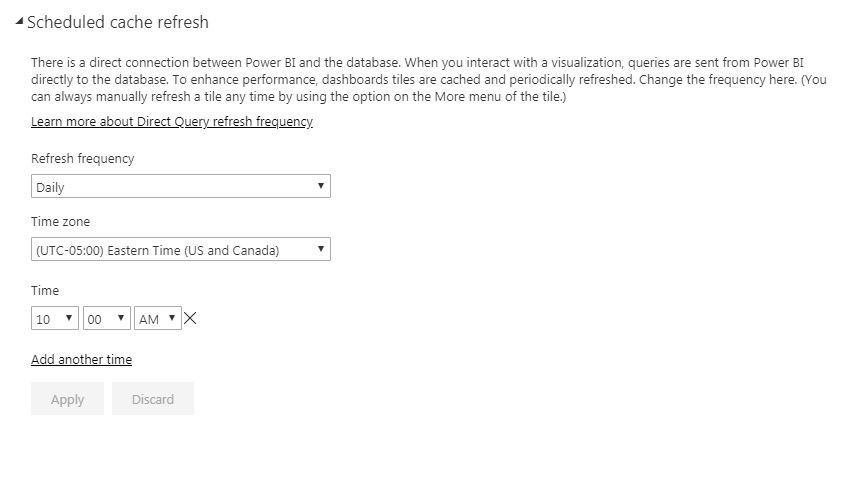
I want to disable Scheduled Cache Refresh which gets setup by default when there is a report thriugh direct query.


I can see the option to configure it to daily/weekly, but can we Disable/Stop that schedule at all in Power BI?


Please find the screenshot below for your reference.

ScheduledCacheRefresh.JPG

1 ACCEPTED SOLUTION
Anonymous
Not applicable

Hi @Anonymous,


Nope, it is impossible to disable scheduled refresh on live connections(direct query, live connection).

For your requirement, I'd like to suggest your use import mode to instead.


Regards,

Xiaoxin Sheng

View solution in original post

4 REPLIES 4
gtraub
Frequent Visitor

This is a big problem, as the cache refresh in our case can use a lot of CPU. Another issue is that it something causes the dataset to revert back to an hourly refresh. I thought it was when a user publishs a report but i tested and thats not the case so not sure what triggers it yet. This is a big issue as it is causing our servers to max out cpu.


Changing the queries to import mode is not always and option as the data sets might be to large for import and you lose the business logic that SSAS provides as well as adding addtional data modeling to this method.

gtraub
Frequent Visitor

This is a big problem, as the cache refresh in our case can use a lot of CPU. Another issue is that it something causes the dataset to revert back to an hourly refresh. I thought it was when a user publishs a report but i tested and thats not the case so not sure what triggers it yet. This is a big issue as it is causing our servers to max out cpu.


Changing the queries to import mode is not always and option as the data sets might be to large for import and you lose the business logic that SSAS provides as well as adding addtional data modeling to this method.

Anonymous
Not applicable

Hi @Anonymous,


Nope, it is impossible to disable scheduled refresh on live connections(direct query, live connection).

For your requirement, I'd like to suggest your use import mode to instead.


Regards,

Xiaoxin Sheng

This is a big problem, as the cache refresh in our case can use a lot of CPU. Another issue is that it something causes the dataset to revert back to an hourly refresh. I thought it was when a user publishs a report but i tested and thats not the case so not sure what triggers it yet. This is a big issue as it is causing our servers to max out cpu. Changing the queries to import mode is not always and option as the data sets might be to large for import and you lose the business logic that SSAS provides as well as adding addtional data modeling to this method.

Helpful resources

Announcements
April Power BI Update Carousel

Power BI Monthly Update - April 2026

Check out the April 2026 Power BI update to learn about new features.

New to Fabric survey Carousel

New to Fabric Survey

If you have recently started exploring Fabric, we'd love to hear how it's going. Your feedback can help with product improvements.

Power BI DataViz World Championships carousel

Power BI DataViz World Championships - June 2026

A new Power BI DataViz World Championship is coming this June! Don't miss out on submitting your entry.

FabCon and SQLCon Highlights Carousel

FabCon &SQLCon Highlights

Experience the highlights from FabCon & SQLCon, available live and on-demand starting April 14th.