cancel
Showing results for 
Search instead for 
Did you mean: 

The Power BI Data Visualization World Championships is back! Get ahead of the game and start preparing now! Learn more

Reply
Tishchenko
Responsive Resident
Responsive Resident

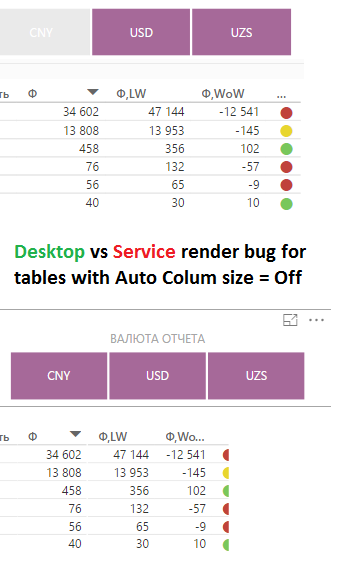
Desktop vs Service report render engine for table visuals

Every time after re-publish Power BI desktop file, i'm must manually make column size correction in service, because
render engine in PowerBI Service "think different" than Desktop render engine  (pict bellow) 
This "out-of-sync" render between Desktop and Service so exasperated 😉 

bug.png

3 REPLIES 3
pinoaino
Advocate I
Advocate I

The same for me ...

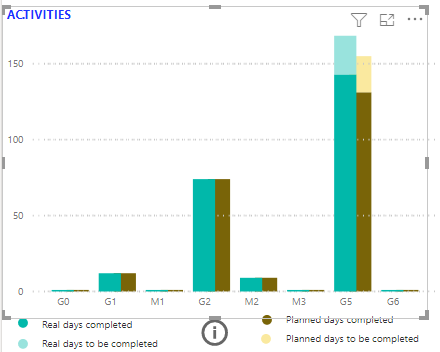
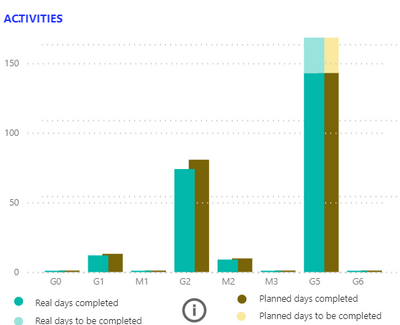
This is a little bit more misleading, in the following charts I've a different proportionality on the Y axis.

Since there is no visual clustered and stacked column chart I have assembled two charts but my workarround does not work although for both uses represent an invisible line of the maximum for both visuals.

Desktop

PowerBI Desktop.png


Service

PowerBI Service.png

ankitpatira
Community Champion
Community Champion

@Tishchenko i would report this to power bi team using Send a Frown.

SabineOussi
Skilled Sharer
Skilled Sharer

I've encoutered this as well.


What I did was to put service and desktop windows side by side, adjust from desktop version what is cropped in service version, save, publish, replace, wait, double check visually, and loop...


This takes more time than creating the actual report!

They should find a fix.

Helpful resources

Announcements
Power BI DataViz World Championships

Power BI Dataviz World Championships

The Power BI Data Visualization World Championships is back! Get ahead of the game and start preparing now!

December 2025 Power BI Update Carousel

Power BI Monthly Update - December 2025

Check out the December 2025 Power BI Holiday Recap!

FabCon Atlanta 2026 carousel

FabCon Atlanta 2026

Join us at FabCon Atlanta, March 16-20, for the ultimate Fabric, Power BI, AI and SQL community-led event. Save $200 with code FABCOMM.