This time we’re going bigger than ever. Fabric, Power BI, SQL, AI and more. We're covering it all. You won't want to miss it.
Learn moreLevel up your Power BI skills this month - build one visual each week and tell better stories with data! Get started
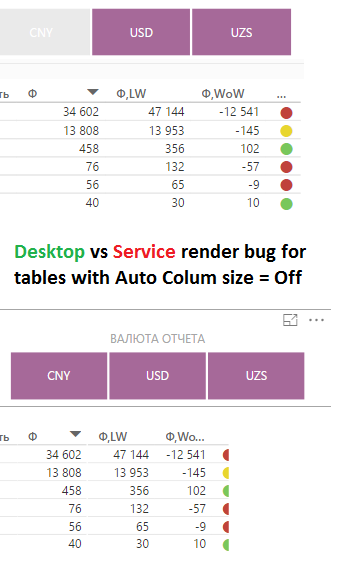
Every time after re-publish Power BI desktop file, i'm must manually make column size correction in service, because
render engine in PowerBI Service "think different" than Desktop render engine (pict bellow)
This "out-of-sync" render between Desktop and Service so exasperated 😉
The same for me ...
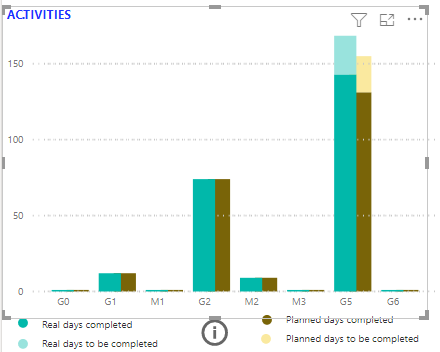
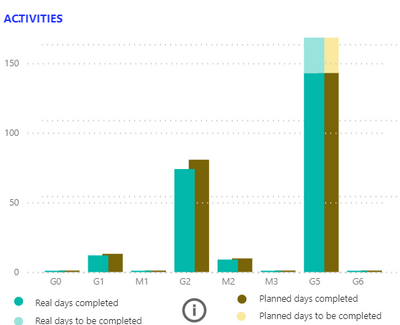
This is a little bit more misleading, in the following charts I've a different proportionality on the Y axis.
Since there is no visual clustered and stacked column chart I have assembled two charts but my workarround does not work although for both uses represent an invisible line of the maximum for both visuals.
Desktop
Service
I've encoutered this as well.
What I did was to put service and desktop windows side by side, adjust from desktop version what is cropped in service version, save, publish, replace, wait, double check visually, and loop...
This takes more time than creating the actual report!
They should find a fix.
Check out the April 2026 Power BI update to learn about new features.
Sign up to receive a private message when registration opens and key events begin.
If you have recently started exploring Fabric, we'd love to hear how it's going. Your feedback can help with product improvements.
| User | Count |
|---|---|
| 11 | |
| 9 | |
| 6 | |
| 6 | |
| 6 |
| User | Count |
|---|---|
| 34 | |
| 26 | |
| 24 | |
| 22 | |
| 22 |