cancel
Showing results for 
Search instead for 
Did you mean: 

Learn from the best! Meet the four finalists headed to the FINALS of the Power BI Dataviz World Championships! Register now

Reply
v_mark
Helper V
Helper V

Deployment Pipelines

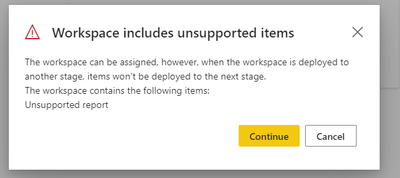
I was trying to do the reverse Deployment Pipe starting with Promoting the Existing premium capacity workspace as a Production Workspace however I am getting an error 

v_mark_0-1624483002998.png


Is there a way to get an indicator saying how many items inside the workspace met/not met the conditions stated in the MS document? Unfortunately, it gives only the generic message so far. Worst case scenario is I need to go to the workspace and check the items inside 1x1. Which definitely takes time to complete 


1 REPLY 1
GilbertQ
Super User
Super User

Hi @v_mark 


As far as I know currently this is the only way to do this


You can vote for the idea here at https://ideas.powerbi.com


Did I answer your question? Mark my post as a solution!

Proud to be a Super User!


Power BI Blog

Helpful resources

Announcements
Join our Fabric User Panel

Join our Fabric User Panel

Share feedback directly with Fabric product managers, participate in targeted research studies and influence the Fabric roadmap.

February Power BI Update Carousel

Power BI Monthly Update - February 2026

Check out the February 2026 Power BI update to learn about new features.

FabCon Atlanta 2026 carousel

FabCon Atlanta 2026

Join us at FabCon Atlanta, March 16-20, for the ultimate Fabric, Power BI, AI and SQL community-led event. Save $200 with code FABCOMM.