cancel
Showing results for 
Search instead for 
Did you mean: 

The Power BI Data Visualization World Championships is back! It's time to submit your entry. Live now!

Reply
Anonymous
Not applicable

Dataset refresh - reference to SharePoint folder

My dataset is referencing to a SharePoint folder, extract the file name and properties in the folder


The requirement is to get the dataset refreshed as soon as a file is added/removed/changed in the folder. 

I understand that I can set up 30 minutes interval scheduled refresh (by 48 manual entries on the scheduled refresh)


Any method I can get a less than 30min refresh interval?   Using Power Automate is not an option. 

If not, is there easier way to set up 48 entries of scheduled refresh?


1 ACCEPTED SOLUTION
v-luwang-msft
Community Support
Community Support

Hi  @Anonymous ,

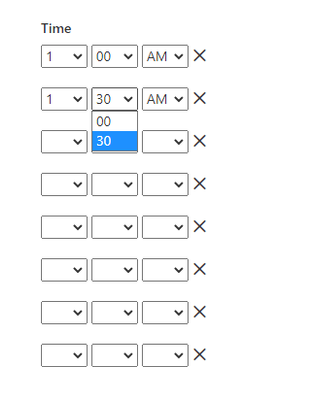
In my opinion, the refresh interval cannot be adjusted to less than 30 minutes unless it is manually refreshed during that time.

vluwangmsft_0-1623912235653.png

And you could read the following article,wish it is helpful for you!

Datasets - Refresh Dataset


View solution in original post

1 REPLY 1
v-luwang-msft
Community Support
Community Support

Hi  @Anonymous ,

In my opinion, the refresh interval cannot be adjusted to less than 30 minutes unless it is manually refreshed during that time.

vluwangmsft_0-1623912235653.png

And you could read the following article,wish it is helpful for you!

Datasets - Refresh Dataset


Helpful resources

Announcements
FabCon Atlanta 2026 carousel

FabCon Atlanta 2026

Join us at FabCon Atlanta, March 16-20, for the ultimate Fabric, Power BI, AI and SQL community-led event. Save $200 with code FABCOMM.