cancel
Showing results for 
Search instead for 
Did you mean: 

Vote for your favorite vizzies from the Power BI Dataviz World Championship submissions. Vote now!

Reply
CSpina
Helper III
Helper III

How to setup MySQL Dataflow using Premium account

Hi, guys.


I was doing tests using mysql in a workspace pro and gateway and everything worked fine.

When I switched to a premium workspace, I couldn't access anymore the database in mysql. The message "Please specify how to connect" appears, even with the correct username and password, I cannot access.
Access in mysql database is done by IP and user. Is that it? What i IP of power bi web?

1 ACCEPTED SOLUTION
Anonymous
Not applicable

Hi @CSpina ,


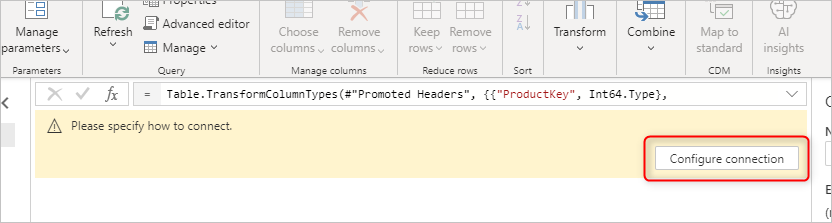
According to the official document, this problem happens when you're connected to a data source, but haven't set up the credentials or connection details yet. It can happen when you migrate queries into a dataflow

Please specify how to connect.png

Reason:

The connection details aren't set up correctly.

Resolution:

Select Configure connection. Set up the connection details and credentials.


Refer to:

https://community.powerbi.com/t5/Service/Dataflow-to-SAP-HANA-unable-to-connect-quot-Please-specify-...


Best Regards,
Eyelyn Qin
If this post helps, then please consider Accept it as the solution to help the other members find it more quickly.

View solution in original post

1 REPLY 1
Anonymous
Not applicable

Hi @CSpina ,


According to the official document, this problem happens when you're connected to a data source, but haven't set up the credentials or connection details yet. It can happen when you migrate queries into a dataflow

Please specify how to connect.png

Reason:

The connection details aren't set up correctly.

Resolution:

Select Configure connection. Set up the connection details and credentials.


Refer to:

https://community.powerbi.com/t5/Service/Dataflow-to-SAP-HANA-unable-to-connect-quot-Please-specify-...


Best Regards,
Eyelyn Qin
If this post helps, then please consider Accept it as the solution to help the other members find it more quickly.

Helpful resources

Announcements
Sticker Challenge 2026 Carousel

Join our Community Sticker Challenge 2026

If you love stickers, then you will definitely want to check out our Community Sticker Challenge!

January Power BI Update Carousel

Power BI Monthly Update - January 2026

Check out the January 2026 Power BI update to learn about new features.

FabCon Atlanta 2026 carousel

FabCon Atlanta 2026

Join us at FabCon Atlanta, March 16-20, for the ultimate Fabric, Power BI, AI and SQL community-led event. Save $200 with code FABCOMM.