This time we’re going bigger than ever. Fabric, Power BI, SQL, AI and more. We're covering it all. You won't want to miss it.
Learn moreDid you hear? There's a new SQL AI Developer certification (DP-800). Start preparing now and be one of the first to get certified. Register now
My dataset is referencing to a SharePoint folder, extract the file name and properties in the folder
The requirement is to get the dataset refreshed as soon as a file is added/removed/changed in the folder.
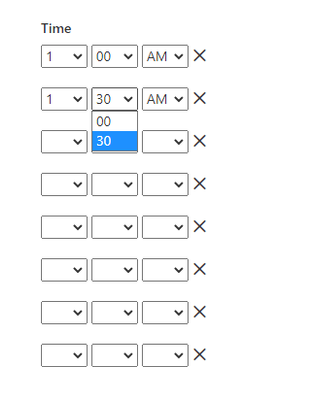
I understand that I can set up 30 minutes interval scheduled refresh (by 48 manual entries on the scheduled refresh)
Any method I can get a less than 30min refresh interval? Using Power Automate is not an option.
If not, is there easier way to set up 48 entries of scheduled refresh?
Solved! Go to Solution.
Hi @Anonymous ,
In my opinion, the refresh interval cannot be adjusted to less than 30 minutes unless it is manually refreshed during that time.
And you could read the following article,wish it is helpful for you!
Hi @Anonymous ,
In my opinion, the refresh interval cannot be adjusted to less than 30 minutes unless it is manually refreshed during that time.
And you could read the following article,wish it is helpful for you!
Check out the April 2026 Power BI update to learn about new features.
Sign up to receive a private message when registration opens and key events begin.
If you have recently started exploring Fabric, we'd love to hear how it's going. Your feedback can help with product improvements.
| User | Count |
|---|---|
| 10 | |
| 8 | |
| 8 | |
| 8 | |
| 7 |
| User | Count |
|---|---|
| 49 | |
| 27 | |
| 24 | |
| 20 | |
| 20 |