cancel
Showing results for 
Search instead for 
Did you mean: 

The Power BI Data Visualization World Championships is back! Get ahead of the game and start preparing now! Learn more

Reply
Anonymous
Not applicable

Dataset refresh failed

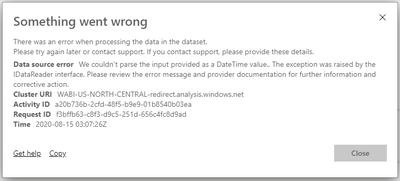
natnatt_0-1597463572407.png

I got this error while trying to refresh the dataset. I dont know why because it was fine when I try to refresh it from the desktop. Does anyone know why and how to resolve it? I try to re-publish over and over again and it still happening.

2 ACCEPTED SOLUTIONS
nandic
Resident Rockstar
Resident Rockstar

@Anonymous ,

If you have error in your Power BI desktop version, it will show you error when you enter Power Query.
pq error.PNG


But if you do not use this column in report everything seems fine, charts are working, slicer are working.. All good.
But once you publish it to Power BI Service and try to refresh it will return the error and you will not get refreshed report.

So first of all, check your Power Query for any errors and try to fix it there.
Here is a post that might help you: https://community.powerbi.com/t5/Desktop/DataFormat-Error-We-couldn-t-parse-the-input-provided-as-a/td-p/84355

View solution in original post

Sujit_Thakur
Solution Sage
Solution Sage

Dear @Anonymous  ,

As error shows , it is telling that your Data has some issue in Date column , please check data type of date column in desktop , and make sure format of your preloaded date is same as format of date column which is going to be added after refresh .


Please let me know if problem is still there .i will be more than happy to help
if this helped you . Please accept as solution .
and please dont forget to give kudos !!
regards,
Thakur Sujit

View solution in original post

2 REPLIES 2
Sujit_Thakur
Solution Sage
Solution Sage

Dear @Anonymous  ,

As error shows , it is telling that your Data has some issue in Date column , please check data type of date column in desktop , and make sure format of your preloaded date is same as format of date column which is going to be added after refresh .


Please let me know if problem is still there .i will be more than happy to help
if this helped you . Please accept as solution .
and please dont forget to give kudos !!
regards,
Thakur Sujit

nandic
Resident Rockstar
Resident Rockstar

@Anonymous ,

If you have error in your Power BI desktop version, it will show you error when you enter Power Query.
pq error.PNG


But if you do not use this column in report everything seems fine, charts are working, slicer are working.. All good.
But once you publish it to Power BI Service and try to refresh it will return the error and you will not get refreshed report.

So first of all, check your Power Query for any errors and try to fix it there.
Here is a post that might help you: https://community.powerbi.com/t5/Desktop/DataFormat-Error-We-couldn-t-parse-the-input-provided-as-a/td-p/84355

Helpful resources

Announcements
Power BI DataViz World Championships

Power BI Dataviz World Championships

The Power BI Data Visualization World Championships is back! Get ahead of the game and start preparing now!

December 2025 Power BI Update Carousel

Power BI Monthly Update - December 2025

Check out the December 2025 Power BI Holiday Recap!

FabCon Atlanta 2026 carousel

FabCon Atlanta 2026

Join us at FabCon Atlanta, March 16-20, for the ultimate Fabric, Power BI, AI and SQL community-led event. Save $200 with code FABCOMM.