We've captured the moments from FabCon & SQLCon that everyone is talking about, and we are bringing them to the community, live and on-demand. Starts on April 14th. Register now
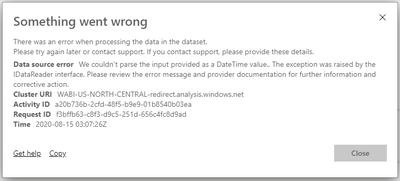
I got this error while trying to refresh the dataset. I dont know why because it was fine when I try to refresh it from the desktop. Does anyone know why and how to resolve it? I try to re-publish over and over again and it still happening.
Solved! Go to Solution.
@Anonymous ,
If you have error in your Power BI desktop version, it will show you error when you enter Power Query.
But if you do not use this column in report everything seems fine, charts are working, slicer are working.. All good.
But once you publish it to Power BI Service and try to refresh it will return the error and you will not get refreshed report.
So first of all, check your Power Query for any errors and try to fix it there.
Here is a post that might help you: https://community.powerbi.com/t5/Desktop/DataFormat-Error-We-couldn-t-parse-the-input-provided-as-a/td-p/84355
Dear @Anonymous ,
As error shows , it is telling that your Data has some issue in Date column , please check data type of date column in desktop , and make sure format of your preloaded date is same as format of date column which is going to be added after refresh .
Please let me know if problem is still there .i will be more than happy to help
if this helped you . Please accept as solution .
and please dont forget to give kudos !!
regards,
Thakur Sujit
Dear @Anonymous ,
As error shows , it is telling that your Data has some issue in Date column , please check data type of date column in desktop , and make sure format of your preloaded date is same as format of date column which is going to be added after refresh .
Please let me know if problem is still there .i will be more than happy to help
if this helped you . Please accept as solution .
and please dont forget to give kudos !!
regards,
Thakur Sujit
@Anonymous ,
If you have error in your Power BI desktop version, it will show you error when you enter Power Query.
But if you do not use this column in report everything seems fine, charts are working, slicer are working.. All good.
But once you publish it to Power BI Service and try to refresh it will return the error and you will not get refreshed report.
So first of all, check your Power Query for any errors and try to fix it there.
Here is a post that might help you: https://community.powerbi.com/t5/Desktop/DataFormat-Error-We-couldn-t-parse-the-input-provided-as-a/td-p/84355
If you have recently started exploring Fabric, we'd love to hear how it's going. Your feedback can help with product improvements.
A new Power BI DataViz World Championship is coming this June! Don't miss out on submitting your entry.
Share feedback directly with Fabric product managers, participate in targeted research studies and influence the Fabric roadmap.