Get certified for free when you join Fabric Data Days 2026 and dive into Fabric, Power BI, SQL, AI, and other essential data skills.
Join nowData Days is here! Join us now for 60+ days of learning, challenges, and connection. Learn more
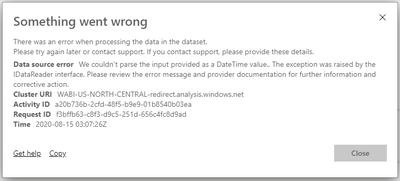
I got this error while trying to refresh the dataset. I dont know why because it was fine when I try to refresh it from the desktop. Does anyone know why and how to resolve it? I try to re-publish over and over again and it still happening.
Solved! Go to Solution.
@Anonymous ,
If you have error in your Power BI desktop version, it will show you error when you enter Power Query.
But if you do not use this column in report everything seems fine, charts are working, slicer are working.. All good.
But once you publish it to Power BI Service and try to refresh it will return the error and you will not get refreshed report.
So first of all, check your Power Query for any errors and try to fix it there.
Here is a post that might help you: https://community.powerbi.com/t5/Desktop/DataFormat-Error-We-couldn-t-parse-the-input-provided-as-a/...
Dear @Anonymous ,
As error shows , it is telling that your Data has some issue in Date column , please check data type of date column in desktop , and make sure format of your preloaded date is same as format of date column which is going to be added after refresh .
Please let me know if problem is still there .i will be more than happy to help
if this helped you . Please accept as solution .
and please dont forget to give kudos !!
regards,
Thakur Sujit
Dear @Anonymous ,
As error shows , it is telling that your Data has some issue in Date column , please check data type of date column in desktop , and make sure format of your preloaded date is same as format of date column which is going to be added after refresh .
Please let me know if problem is still there .i will be more than happy to help
if this helped you . Please accept as solution .
and please dont forget to give kudos !!
regards,
Thakur Sujit
@Anonymous ,
If you have error in your Power BI desktop version, it will show you error when you enter Power Query.
But if you do not use this column in report everything seems fine, charts are working, slicer are working.. All good.
But once you publish it to Power BI Service and try to refresh it will return the error and you will not get refreshed report.
So first of all, check your Power Query for any errors and try to fix it there.
Here is a post that might help you: https://community.powerbi.com/t5/Desktop/DataFormat-Error-We-couldn-t-parse-the-input-provided-as-a/...
Don't miss out on Data Days, June 15 through August 7. Learn Fabric, Power BI, SQL, AI and more.
Check out the May 2026 Power BI update to learn about new features.
| User | Count |
|---|---|
| 16 | |
| 10 | |
| 10 | |
| 8 | |
| 7 |
| User | Count |
|---|---|
| 41 | |
| 36 | |
| 34 | |
| 28 | |
| 20 |