This is best Fabric, Power BI, SQL and AI community event. How do we know? The last event sold out! Save €200 with code FABCMTY200.
Register nowA new Data Days event is coming soon! This time we’re going bigger than ever. Fabric, Power BI, SQL, AI and more. Don't miss out.
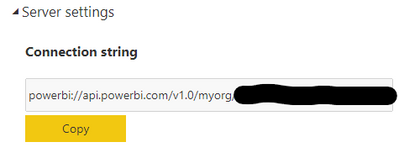
In PBI Service, I choose the 3 vertical ellipses to the right of the dataset name to get more options. Under the More Options selection I choose Settings, and in there I have a selection for Server Settings.
This is populated with the URL, with the blacked out portion being our Workspace name and dataset name. I can copy/paste this URL as the server name in our on-premise SSAS and view the entire data model in SSAS. I could even use that as a data source for other PBI reporting if desired. It's as if during the publication of the model from Desktop, it also created a copy of the model in SSAS. I'm looking at other clients I"ve had in the past, and this Server Settings option isn't even visible. The question is, what is this? Is there something about the installation of Power BI at this client that allows this? I don't hate it - I just don't understand how it's making this "model" in the on-premise version of SSAS.
Solved! Go to Solution.
This feature is limited to Premium capacity worksapce.
The activity you performed was takedn backup of your dataset
Backup and restore Power BI Premium datasets (preview) - Power BI | Microsoft Docs
If this post helps, then please consider Accept it as the solution and give it a thumbs up
That explains alot. I've only dealt with Pro license clients, so I've never seen this before. Thanks!
This feature is limited to Premium capacity worksapce.
The activity you performed was takedn backup of your dataset
Backup and restore Power BI Premium datasets (preview) - Power BI | Microsoft Docs
If this post helps, then please consider Accept it as the solution and give it a thumbs up
Check out the May 2026 Power BI update to learn about new features.
Sign up to receive a private message when registration opens and key events begin.
If you have recently started exploring Fabric, we'd love to hear how it's going. Your feedback can help with product improvements.
| User | Count |
|---|---|
| 11 | |
| 8 | |
| 8 | |
| 6 | |
| 6 |
| User | Count |
|---|---|
| 24 | |
| 24 | |
| 23 | |
| 19 | |
| 16 |