This time we’re going bigger than ever. Fabric, Power BI, SQL, AI and more. We're covering it all. You won't want to miss it.
Learn moreDid you hear? There's a new SQL AI Developer certification (DP-800). Start preparing now and be one of the first to get certified. Register now
If I import an Excel spreadsheet into Dataflows, the date columns import as Text, and I cannot change the data type to Date. How can I do this please?
Solved! Go to Solution.
To do this, I needed to edit the 'Changed Type' step in Power Query Editor - just change where it says 'type text' to 'type date'
Correct - We use slightly different UI paradigms. You can adjust column types from the column header where you see the type icon (i.e. "abc", "123" , "1.2", etc.)
To do this, I needed to edit the 'Changed Type' step in Power Query Editor - just change where it says 'type text' to 'type date'
There's currently no automatic type detection in Power Query Online when importing data from an Excel file. We will address this gap in the future (don't have a firm timeline yet).
In the interim, you should be able to change column types from the Column header type indicator icon. Could you provide some more details on what you mean by "could not change the type to date"? Did you run into any tool errors in try to do this?
Thanks,
M.
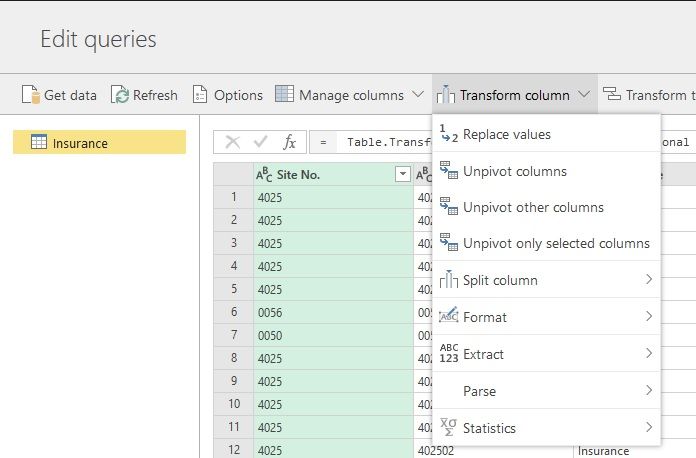
If you select 'Transform Column' in the service, there is no Data Type option in there, like there is in Desktop. See below:
Cannot set Data type in Service
Can set Data type in Desktop
Correct - We use slightly different UI paradigms. You can adjust column types from the column header where you see the type icon (i.e. "abc", "123" , "1.2", etc.)
Aha, didnt know you could press on the 'ABC', '123' etc
Check out the April 2026 Power BI update to learn about new features.
Sign up to receive a private message when registration opens and key events begin.
If you have recently started exploring Fabric, we'd love to hear how it's going. Your feedback can help with product improvements.
| User | Count |
|---|---|
| 10 | |
| 8 | |
| 8 | |
| 8 | |
| 7 |
| User | Count |
|---|---|
| 49 | |
| 27 | |
| 24 | |
| 20 | |
| 20 |