cancel
Showing results for 
Search instead for 
Did you mean: 

The Power BI Data Visualization World Championships is back! It's time to submit your entry. Live now!

Reply
ansa_naz
Continued Contributor

Dataflows - cannot set data type??

If I import an Excel spreadsheet into Dataflows, the date columns import as Text, and I cannot change the data type to Date. How can I do this please?

2 ACCEPTED SOLUTIONS
ansa_naz
Continued Contributor

To do this, I needed to edit the 'Changed Type' step in Power Query Editor - just change where it says 'type text' to 'type date'

View solution in original post

Correct - We use slightly different UI paradigms. You can adjust column types from the column header where you see the type icon (i.e. "abc", "123" , "1.2", etc.)

View solution in original post

5 REPLIES 5
ansa_naz
Continued Contributor

To do this, I needed to edit the 'Changed Type' step in Power Query Editor - just change where it says 'type text' to 'type date'

There's currently no automatic type detection in Power Query Online when importing data from an Excel file. We will address this gap in the future (don't have a firm timeline yet).


In the interim, you should be able to change column types from the Column header type indicator icon. Could you provide some more details on what you mean by "could not change the type to date"? Did you run into any tool errors in try to do this?


Thanks,
M.

ansa_naz
Continued Contributor

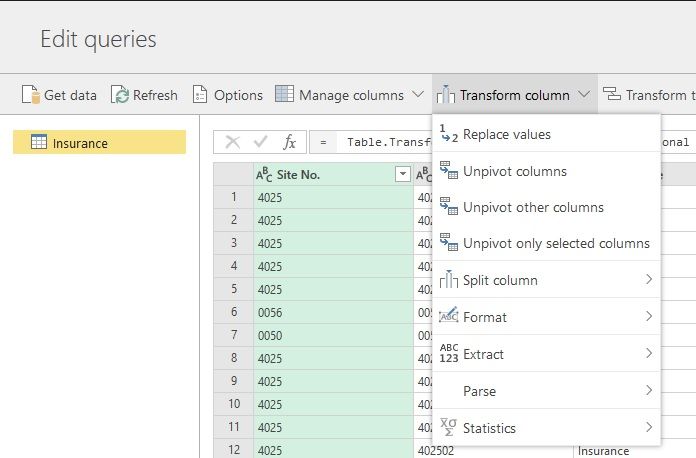
If you select 'Transform Column' in the service, there is no Data Type option in there, like there is in Desktop. See below:


Cannot set Data type in ServiceCannot set Data type in ServiceCan set Data type in DesktopCan set Data type in Desktop


Correct - We use slightly different UI paradigms. You can adjust column types from the column header where you see the type icon (i.e. "abc", "123" , "1.2", etc.)

ansa_naz
Continued Contributor

Aha, didnt know you could press on the 'ABC', '123' etc

Helpful resources

Announcements
December 2025 Power BI Update Carousel

Power BI Monthly Update - December 2025

Check out the December 2025 Power BI Holiday Recap!

FabCon Atlanta 2026 carousel

FabCon Atlanta 2026

Join us at FabCon Atlanta, March 16-20, for the ultimate Fabric, Power BI, AI and SQL community-led event. Save $200 with code FABCOMM.