Get certified for free when you join Fabric Data Days 2026 and dive into Fabric, Power BI, SQL, AI, and other essential data skills.
Join nowTry your skills in the Power BI Dataviz World Championship! Round one ends June 26. Join now
Solved! Go to Solution.
Well, after a couple of tries, I just thought.... Let's use another browser than Microsoft Edge....
And guess! Problem disappeared while using Chrome!
I did exact the same in Edge as in Chrome. Edge did behave exactly the same, no errors or exeptions. But somehow Edge does something with in the query window which causes the issue that data is not stored correct in PowerBI Service.
Hi Greg, unfortuntately, the records are blank after data load as well. Only with count, I can see that the correct number of records are returned. Thanks for your response.
Hi @Jankwi_onl ,
Do you use any query while connecting with SQL?Such as any aggregations or filtering?
Hi Kelly,
Thanks for responding. No, I do not use any aggrication or filtering. It's just a select on the full table.
Hi @Jankwi_onl ,
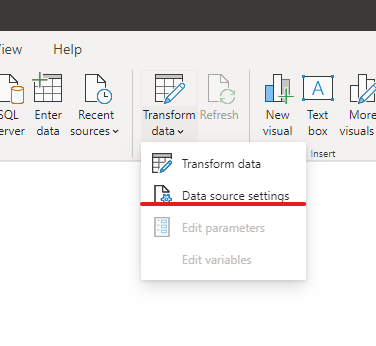
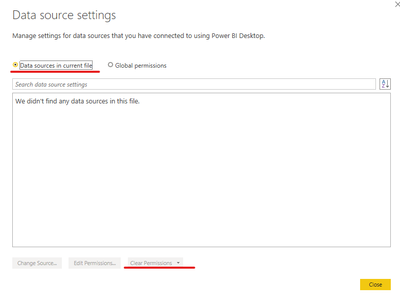
I‘ve checked many docs but unfortunately I cant find the reason,so pls try to clear your data source then reenter it:
If it doesnt work ,you'd better propose a support ticket.
https://powerbi.microsoft.com/en-us/support/
Well, after a couple of tries, I just thought.... Let's use another browser than Microsoft Edge....
And guess! Problem disappeared while using Chrome!
I did exact the same in Edge as in Chrome. Edge did behave exactly the same, no errors or exeptions. But somehow Edge does something with in the query window which causes the issue that data is not stored correct in PowerBI Service.
Don't miss out on Data Days, June 15 through August 7. Learn Fabric, Power BI, SQL, AI and more.
Check out the May 2026 Power BI update to learn about new features.
| User | Count |
|---|---|
| 16 | |
| 11 | |
| 11 | |
| 8 | |
| 7 |
| User | Count |
|---|---|
| 36 | |
| 33 | |
| 31 | |
| 29 | |
| 20 |