cancel
Showing results for 
Search instead for 
Did you mean: 

We've captured the moments from FabCon & SQLCon that everyone is talking about, and we are bringing them to the community, live and on-demand. Starts on April 14th. Register now

Reply
Jankwi_onl
Frequent Visitor

Dataflow returns only blank values using a on-premise SQL server with enterprise gateway

Hi all,
When I create a dataflow with a SQL server as datasource and a gateway, I do get records in the Power Query window while creating the dataflow. 
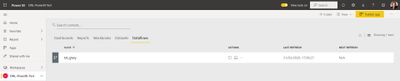
Dataflowissue1.JPG
When I save and refresh the dataflow I do not get any errors.
Dataflowissue3.JPG
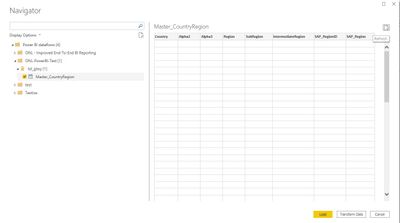
I use PowerBI desktop to connect to the dataflow. But when I select the table, the preview returns only blank values for each column.
 Dataflowissue4.JPG
Strange enough the query is retrieving the correct number of records.
Dataflowissue5.JPG
Can anybody explain what might be the issue that all values are showing as blank values?
Dataflow returns only blank values using a on-premise SQL server with enterprise gateway.
When I only use a Blank Table as datasource with some testrecords in a dataflow, these data are visuable. As soon as I add a datasource using the gateway in the same dataflow, both entities will return blank values.
 
Thanks for your help in advance!
1 ACCEPTED SOLUTION

Well, after a couple of tries, I just thought.... Let's use another browser than Microsoft Edge....

And guess! Problem disappeared while using Chrome!

I did exact the same in Edge as in Chrome. Edge did behave exactly the same, no errors or exeptions. But somehow Edge does something with in the query window which causes the issue that data is not stored correct in PowerBI Service.

View solution in original post

6 REPLIES 6
Greg_Deckler
Community Champion
Community Champion

I have seen the behavior where in preview everything is blank but when you actually load the data it is there. Is that what you are seeing as well?


Follow on LinkedIn
@ me in replies or I'll lose your thread!!!
Instead of a Kudo, please vote for this idea
Become an expert!: Enterprise DNA
External Tools: MSHGQM
YouTube Channel!: Microsoft Hates Greg
Latest book!:
DAX For Humans

DAX is easy, CALCULATE makes DAX hard...

Hi Greg, unfortuntately, the records are blank after data load as well. Only with count, I can see that the correct number of records are returned. Thanks for your response.

Hi @Jankwi_onl ,


Do you use any query while connecting with SQL?Such as any aggregations or filtering?


Best Regards,
Kelly
Did I answer your question? Mark my post as a solution!

Hi Kelly, 


Thanks for responding. No, I do not use any aggrication or filtering. It's just a select on the full table.


Hi @Jankwi_onl


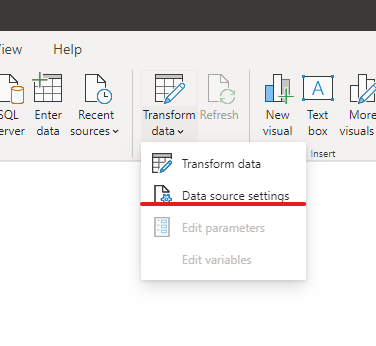
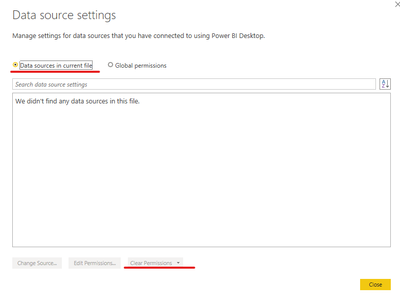
I‘ve checked many docs but unfortunately I cant find the reason,so pls try to clear your data source then reenter it:Annotation 2020-04-07 094342.pngAnnotation 2020-04-07 094858.png

If it doesnt work ,you'd better propose a support ticket.


https://powerbi.microsoft.com/en-us/support/

Support Ticket.gif


Best Regards,
Kelly
Did I answer your question? Mark my post as a solution!


Well, after a couple of tries, I just thought.... Let's use another browser than Microsoft Edge....

And guess! Problem disappeared while using Chrome!

I did exact the same in Edge as in Chrome. Edge did behave exactly the same, no errors or exeptions. But somehow Edge does something with in the query window which causes the issue that data is not stored correct in PowerBI Service.

Helpful resources

Announcements
New to Fabric survey Carousel

New to Fabric Survey

If you have recently started exploring Fabric, we'd love to hear how it's going. Your feedback can help with product improvements.

Power BI DataViz World Championships carousel

Power BI DataViz World Championships - June 2026

A new Power BI DataViz World Championship is coming this June! Don't miss out on submitting your entry.

Join our Fabric User Panel

Join our Fabric User Panel

Share feedback directly with Fabric product managers, participate in targeted research studies and influence the Fabric roadmap.

March Power BI Update Carousel

Power BI Community Update - March 2026

Check out the March 2026 Power BI update to learn about new features.

Top Solution Authors