
This time we’re going bigger than ever. Fabric, Power BI, SQL, AI and more. We're covering it all. You won't want to miss it.
Learn moreDid you hear? There's a new SQL AI Developer certification (DP-800). Start preparing now and be one of the first to get certified. Register now
The dataflow refresh failure happened since 1/31/2021, but the error message doesn't indicate which query has problem. As i know, the error message can show which query has problem before 1/31/2021.
Now 50% dataflows owned by me can not refresh, i am crazy.
I need a urgent help!!!
Solved! Go to Solution.
Hi @Kenyan,
I'm sorry you're having this issue and having trouble solving it.
Your best bet would be filing a support ticket, which is free for Pro users.
Go to the support page to file a support ticket, search for existing issues related to yours, and if you can't find any then click on the button shown below:
Hi @Kenyan
Was a solution provided to you after you raised a ticket? I am in the same situation now and cannot find any documentation to support whether this was an intentional change by MS or a setting we need to adjust somewhere to revert the change.
There was a problem refreshing your dataflow
Your Process_YR_MP dataflow couldn’t be refreshed because there was a problem with one or more entities, or because dataflow capabilities were unavailable.
The next refresh for “Process_YR_MP” is scheduled for February 3, 2021 3:30 UTC.
Learn more >
Technical information
Activity ID:
9c82b715-df4c-484d-ad67-9ec66c19bf0b
Request ID:
5e4d8ae2-8a84-4ae1-be95-fcf92d2a5a4c
Cluster name:
WABI-US-NORTH-CENTRAL-C-PRIMARY-redirect.analysis.windows.net
Refresh start time:
February 2, 2021 18:01 UTC
Refresh end time:
February 2, 2021 18:01 UTC
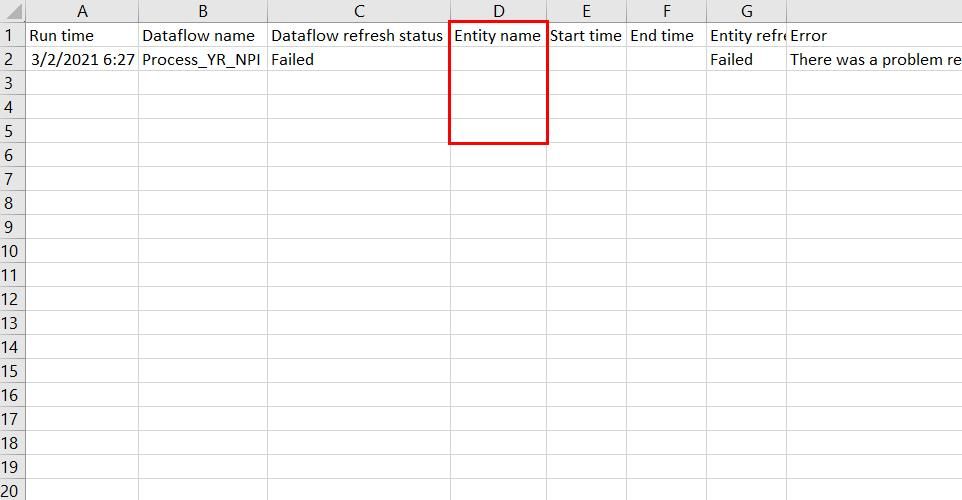
Below is the previous error file, we can see shich entity has problem.
Below is current error file, it doesn't show which entity has problem, i am crazy to debug the data issue.
I has spent over eight hours in locating the issue, but i don't know where is the problem till now. Need a urgent help!!!
Hi @Kenyan,
I'm sorry you're having this issue and having trouble solving it.
Your best bet would be filing a support ticket, which is free for Pro users.
Go to the support page to file a support ticket, search for existing issues related to yours, and if you can't find any then click on the button shown below:
Check out the April 2026 Power BI update to learn about new features.
Sign up to receive a private message when registration opens and key events begin.
If you have recently started exploring Fabric, we'd love to hear how it's going. Your feedback can help with product improvements.
| User | Count |
|---|---|
| 10 | |
| 8 | |
| 7 | |
| 7 | |
| 7 |
| User | Count |
|---|---|
| 49 | |
| 27 | |
| 21 | |
| 20 | |
| 20 |