
cancel
Showing results for 
Search instead for 
Did you mean: 

The Fabric community is upgrading! Read all of the details including the timeline and what you can expect. Learn more

Reply
Kenyan
Regular Visitor

Dataflow refresh failure

The dataflow refresh failure happened since 1/31/2021, but the error message doesn't indicate which query has problem. As i know, the error message can show which query has problem before 1/31/2021.


Now 50% dataflows owned by me can not refresh, i am crazy. 


I need a urgent help!!!

1 ACCEPTED SOLUTION
nickyvv
Most Valuable Professional

Hi @Kenyan,


I'm sorry you're having this issue and having trouble solving it.

Your best bet would be filing a support ticket, which is free for Pro users.

Go to the support page to file a support ticket, search for existing issues related to yours, and if you can't find any then click on the button shown below:

nickyvv_0-1612309738578.png


Did I answer your question? Mark my post as a solution!

Blog: nickyvv.com | @NickyvV


View solution in original post

5 REPLIES 5
Anonymous
Not applicable

Hi @Kenyan


Was a solution provided to you after you raised a ticket? I am in the same situation now and cannot find any documentation to support whether this was an intentional change by MS or a setting we need to adjust somewhere to revert the change.

Kenyan
Regular Visitor

There was a problem refreshing your dataflow
Your Process_YR_MP dataflow couldn’t be refreshed because there was a problem with one or more entities, or because dataflow capabilities were unavailable.
The next refresh for “Process_YR_MP” is scheduled for February 3, 2021 3:30 UTC.

Learn more >


Technical information

Activity ID:
9c82b715-df4c-484d-ad67-9ec66c19bf0b

Request ID:
5e4d8ae2-8a84-4ae1-be95-fcf92d2a5a4c

Cluster name:
WABI-US-NORTH-CENTRAL-C-PRIMARY-redirect.analysis.windows.net

Refresh start time:
February 2, 2021 18:01 UTC

Refresh end time:
February 2, 2021 18:01 UTC


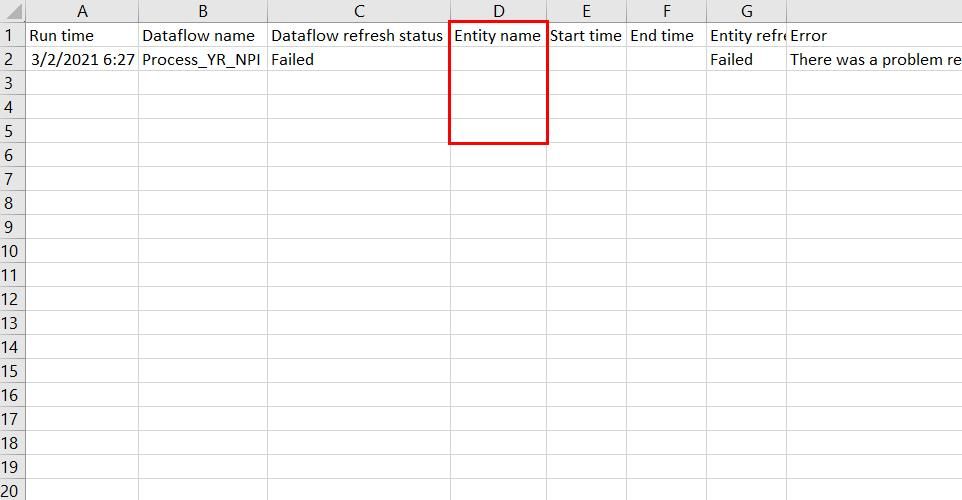
Below is the previous error file, we can see shich entity has problem.previous error file.jpg


Below is current error file, it doesn't show which entity has problem, i am crazy to debug the data issue.current error file.jpg

I has spent over eight hours in locating the issue, but i don't know where is the problem till now.  Need a urgent help!!!

nickyvv
Most Valuable Professional

Hi @Kenyan,


I'm sorry you're having this issue and having trouble solving it.

Your best bet would be filing a support ticket, which is free for Pro users.

Go to the support page to file a support ticket, search for existing issues related to yours, and if you can't find any then click on the button shown below:

nickyvv_0-1612309738578.png


Did I answer your question? Mark my post as a solution!

Blog: nickyvv.com | @NickyvV


Helpful resources

Announcements
FabCon and SQLCon Barcelona 2026

FabCon & SQLCon – Barcelona 2026

Join us in Barcelona for FabCon and SQLCon, the Fabric, Power BI, SQL, and AI community event. Save €200 with code FABCMTY200.

Power BI DataViz World Championships carousel

Power BI DataViz World Championships - June 2026

A new Power BI DataViz World Championship is coming this June! Don't miss out on submitting your entry.