
This time we’re going bigger than ever. Fabric, Power BI, SQL, AI and more. We're covering it all. You won't want to miss it.
Learn moreLevel up your Power BI skills this month - build one visual each week and tell better stories with data! Get started
Good morning,
Please allow me to share a little context to explain a situation in which I will appreciate guidance...
I believe the following three options to be potential solutions (but haven't been able to find a helpful resource as to how to accomplish task)
TL; DR: I would appreciate any advice regarding what could be the best way to create a dataflow (on the Power BI Server environment) based on a folder that combines multiple excel files.
Thank you.
Hi @adelhumeau ,
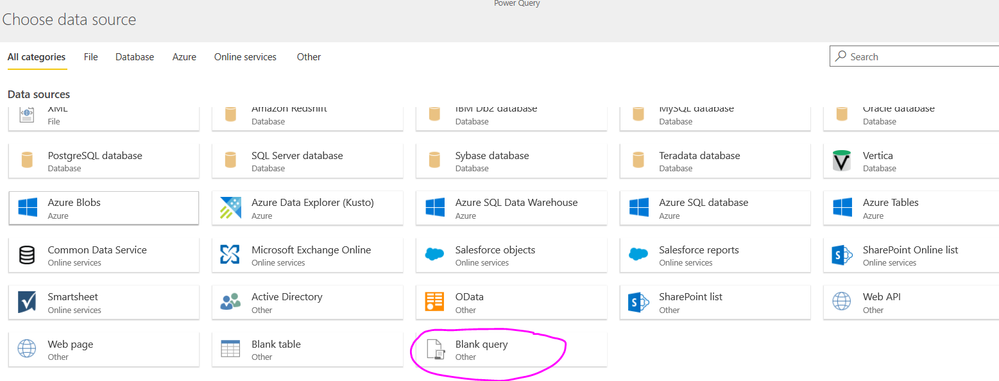
Please use the desktop to get data in folder and then combine them, after that, copy the M code to blank query in the dataflow.
Hello @v-diye-msft !
I am encoutering the same problem and I tried to apply your solution.
I copied the code from the Desktop:
let
Source = Folder.Files("MyPath"),
#"Filtered Hidden Files1" = Table.SelectRows(Source, each [Attributes]?[Hidden]? <> true),
#"Invoke Custom Function1" = Table.AddColumn(#"Filtered Hidden Files1", "Transform File (2)", each #"Transform File (2)"([Content])),
#"Renamed Columns1" = Table.RenameColumns(#"Invoke Custom Function1", {"Name", "Source.Name"}),
#"Removed Other Columns1" = Table.SelectColumns(#"Renamed Columns1", {"Source.Name", "Transform File (2)"}),
#"Expanded Table Column1" = Table.ExpandTableColumn(#"Removed Other Columns1", "Transform File (2)", Table.ColumnNames(#"Transform File (2)"(#"Sample File (2)"))),
#"Changed Type" = Table.TransformColumnTypes(#"Expanded Table Column1",{{"Source.Name", type text}, {"RESORT_CODE", type text}, {"CONFIRMATION_NO", Int64.Type}, {"TEL", type any}})
in
#"Changed Type"
However, I get this message :
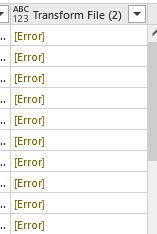
And indeed, if I go to the step #"Invoke Custom Function1", I can see that the query gives an [Error] instead of a [Table] :
Do you know how I could overcome this issue ?
I got the solution here : https://community.powerbi.com/t5/Service/Problem-connecting-dataflow-to-a-local-folder/m-p/2668717#M...
I would read this. This might help you decide.
https://docs.microsoft.com/en-us/power-bi/service-dataflows-on-premises-gateways
Hi @Anonymous ,
If my above post helps, could you please consider Accept it as the solution to help the other members find it more quickly. thanks!
Check out the April 2026 Power BI update to learn about new features.
Sign up to receive a private message when registration opens and key events begin.
If you have recently started exploring Fabric, we'd love to hear how it's going. Your feedback can help with product improvements.
| User | Count |
|---|---|
| 11 | |
| 9 | |
| 9 | |
| 7 | |
| 6 |
| User | Count |
|---|---|
| 47 | |
| 27 | |
| 24 | |
| 24 | |
| 22 |