Don't miss your chance to take the Fabric Data Engineer (DP-700) exam on us!
Learn moreWe've captured the moments from FabCon & SQLCon that everyone is talking about, and we are bringing them to the community, live and on-demand. Starts on April 14th. Register now
I have connected to Azure Analysis service from PBI desktop and published the file in Power BI Service WorkSpace.
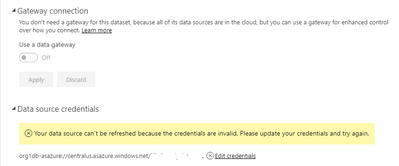
The data set in the service does not seem to refresh because of Data Source credentials issue :
"Your data source can't be refreshed because the credentials are invalid. Please update your credentials and try again."
However the same credentials works fine on PBI desktop and the data set refreshes.
Note: Gate Connection in Dataset settings says - "You don't need a gateway for this dataset, because all of its data sources are in the cloud, but you can use a gateway for enhanced control over how you connect."
Can someone suggest any fix for this ?
This issue is no longer at the support page, but I still got the issue when trying to set up the scheduled refresh.
HI @kkalyanthaya,
This known issue will be fixed on 6/8/2018. You can look at support page to know more about this.
Users may not be able to set credentials if they are using OAuth2 for SQL Azure or AS Azure data sources. Engineers are aware of the issue and are working on a fix . Next Update @06/08/2018 22:30 UTC.
Regards,
Xiaoxin Sheng
Hi, thanks for the update, And it's good to know that the fault is not in our environment .
I have had this same but we are trying to connect to a SQL Server, but the thing is that I've been trying to log in with the database creditentials.
Hi @kkalyanthaya,
I can reproduce your issue, it seems like oauth credentials not works on service side.
I will report this to power bi team and update here if any feedback.
Regards,
Xiaoxin Sheng
If you have recently started exploring Fabric, we'd love to hear how it's going. Your feedback can help with product improvements.
A new Power BI DataViz World Championship is coming this June! Don't miss out on submitting your entry.
Share feedback directly with Fabric product managers, participate in targeted research studies and influence the Fabric roadmap.
| User | Count |
|---|---|
| 29 | |
| 23 | |
| 18 | |
| 17 | |
| 14 |