cancel
Showing results for 
Search instead for 
Did you mean: 

Learn from the best! Meet the four finalists headed to the FINALS of the Power BI Dataviz World Championships! Register now

Reply
Anonymous
Not applicable

Data Refresh Error

Hello,


I think this is another simple question and answer.


I'm receiving the following error when trying to refresh a dataset on PowerBI Service to a dataset in a PowerBI Desktop File.


Error.png


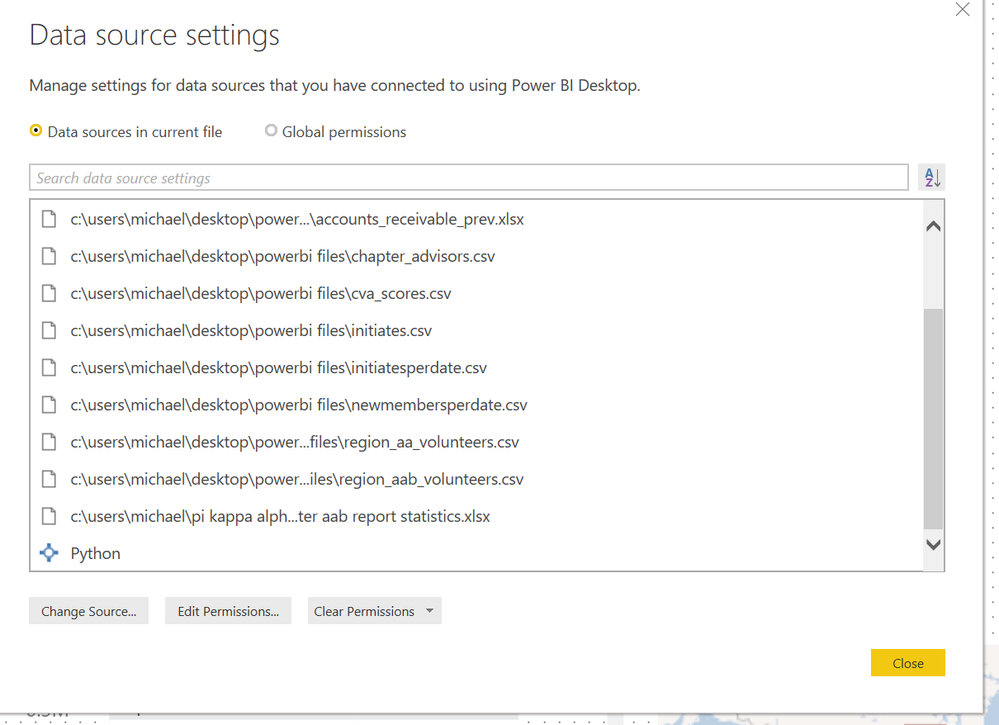
I assume it is because a datasource is not correct.  However, all of my data sources are either locally hosted (on my laptop) .csv or .xlsx files EXCEPT for the "python" file/app that is also listed.  See below:


Sources.PNG


Is the error I am getting when refreshing the dataset due to having Python listed as a source?  How do I delete it as a source if so?  Can I not use python scripts in PowerQuery to clean and transform data if I want to be able to publish and refresh the same dataset in PowerBI Service?


Any help would be great.  My Python code is not particuluary complicated (only uses pandas to do a few row wise calculations) so I'm sure I could rewrite it in Dax/M if needed.


Thanks,

Michael

1 ACCEPTED SOLUTION
v-lili6-msft
Community Support
Community Support

hi, @Anonymous 

Python is only supported for Gateway personal mode. You need to install a personal gateway.

https://docs.microsoft.com/en-us/power-bi/service-gateway-personal-mode#frequently-asked-questions-faq


Best Regards,

Lin


Community Support Team _ Lin
If this post helps, then please consider Accept it as the solution to help the other members find it more quickly.

View solution in original post

1 REPLY 1
v-lili6-msft
Community Support
Community Support

hi, @Anonymous 

Python is only supported for Gateway personal mode. You need to install a personal gateway.

https://docs.microsoft.com/en-us/power-bi/service-gateway-personal-mode#frequently-asked-questions-faq


Best Regards,

Lin


Community Support Team _ Lin
If this post helps, then please consider Accept it as the solution to help the other members find it more quickly.

Helpful resources

Announcements
Join our Fabric User Panel

Join our Fabric User Panel

Share feedback directly with Fabric product managers, participate in targeted research studies and influence the Fabric roadmap.

March Power BI Update Carousel

Power BI Community Update - March 2026

Check out the March 2026 Power BI update to learn about new features.