This time we’re going bigger than ever. Fabric, Power BI, SQL, AI and more. We're covering it all. You won't want to miss it.
Learn moreLevel up your Power BI skills this month - build one visual each week and tell better stories with data! Get started
Hello,
I think this is another simple question and answer.
I'm receiving the following error when trying to refresh a dataset on PowerBI Service to a dataset in a PowerBI Desktop File.
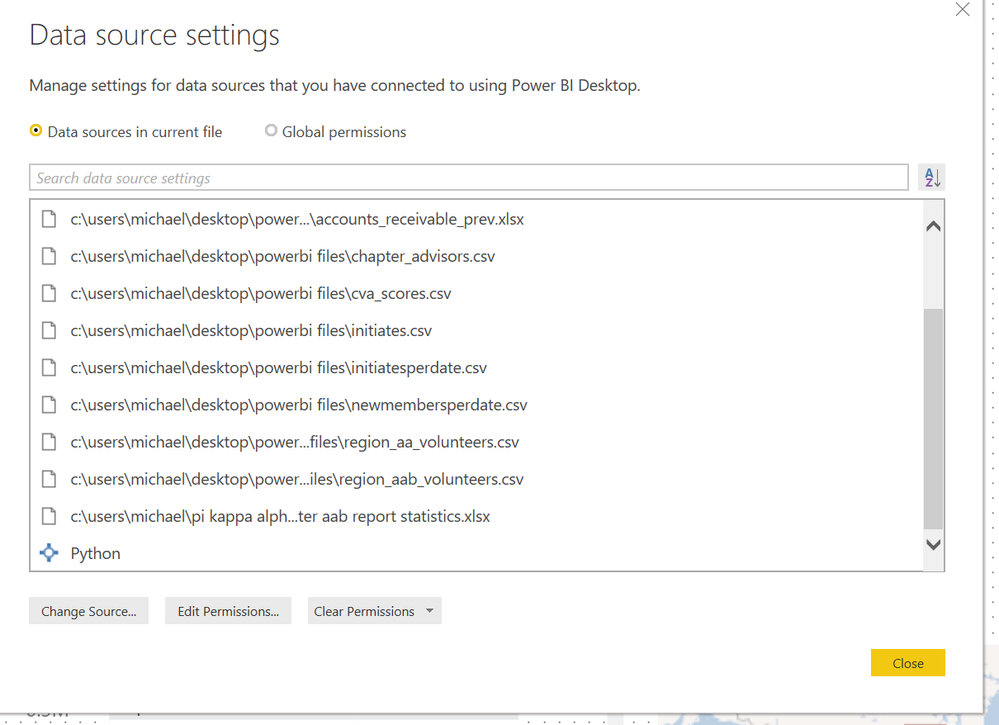
I assume it is because a datasource is not correct. However, all of my data sources are either locally hosted (on my laptop) .csv or .xlsx files EXCEPT for the "python" file/app that is also listed. See below:
Is the error I am getting when refreshing the dataset due to having Python listed as a source? How do I delete it as a source if so? Can I not use python scripts in PowerQuery to clean and transform data if I want to be able to publish and refresh the same dataset in PowerBI Service?
Any help would be great. My Python code is not particuluary complicated (only uses pandas to do a few row wise calculations) so I'm sure I could rewrite it in Dax/M if needed.
Thanks,
Michael
Solved! Go to Solution.
hi, @Anonymous
Python is only supported for Gateway personal mode. You need to install a personal gateway.
Best Regards,
Lin
hi, @Anonymous
Python is only supported for Gateway personal mode. You need to install a personal gateway.
Best Regards,
Lin
Sign up to receive a private message when registration opens and key events begin.
If you have recently started exploring Fabric, we'd love to hear how it's going. Your feedback can help with product improvements.
| User | Count |
|---|---|
| 11 | |
| 10 | |
| 7 | |
| 7 | |
| 6 |
| User | Count |
|---|---|
| 27 | |
| 23 | |
| 22 | |
| 22 | |
| 17 |